Your Android app is built, tested, and ready. The next hurdle isn’t code. It’s getting a Google Play Console developer account approved, your identity verified, and your first release through a review process that changed a fair bit over the last two years. India publishers run into the same snags every time: the international card requirement, the 14-day testing window for new accounts, and a data safety form that Google actually cross-checks. None of it is hard once you know the order. Most people just don’t find out about the steps until they’re stuck on one.
This guide walks through the whole setup, start to finish, with the real costs and the 2026 rules.
It assumes the app itself is roughly done. If you are earlier than that, our walkthrough of the development process covers the five phases that come before this one, and the step by step build guide starts from nothing. Set the account up during the build rather than at the end, because two of the delays below run in the background and cost nothing if they start early.
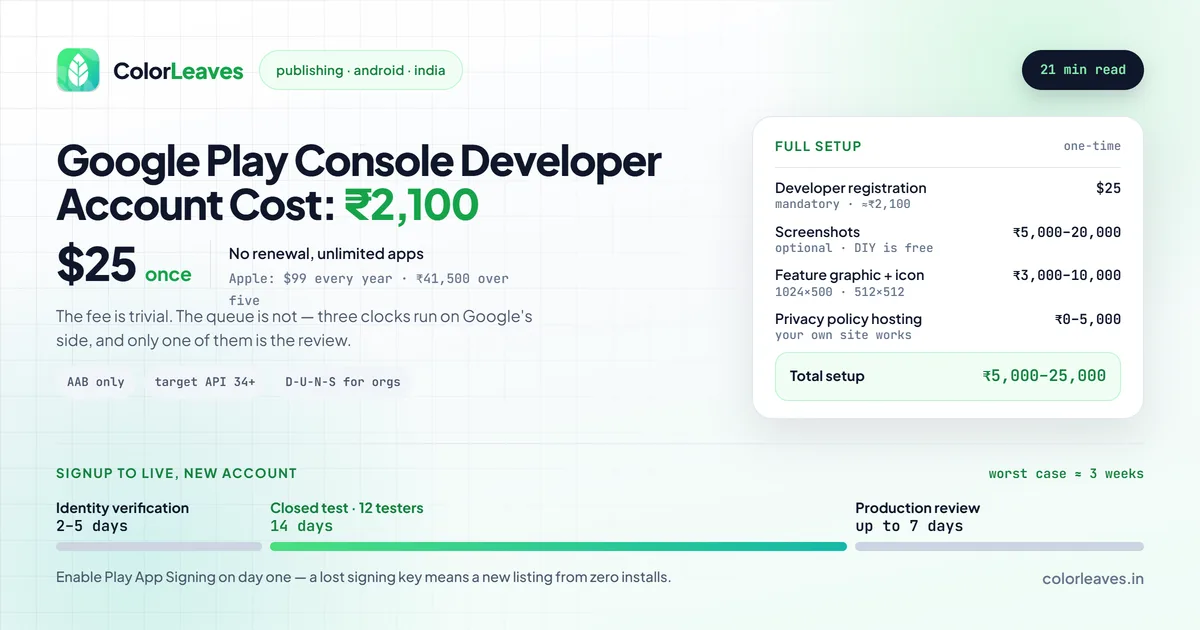
Key Takeaway: A Google Play Console developer account costs $25 (about ₹2,100) as a one-time fee. Add screenshots, graphics, and a privacy policy page and your full setup lands around ₹5,000 to ₹25,000. Plan for 2 to 5 days of identity verification, and if it’s a new personal account, a 14-day closed test with at least 12 testers before you can publish.
What the Play Console Actually Is
The Play Console is Google’s dashboard for everything related to your Android apps. You create the developer account there, verify your identity, upload your app, write the store listing, set pricing, fill compliance forms, and track installs and crashes after launch. One account covers unlimited apps, so you pay the registration fee once and never again.
You’ll do all of this from a browser. No special software needed for the account itself, though you’ll need a build tool to generate the app file you upload later.
The $25 Registration Fee
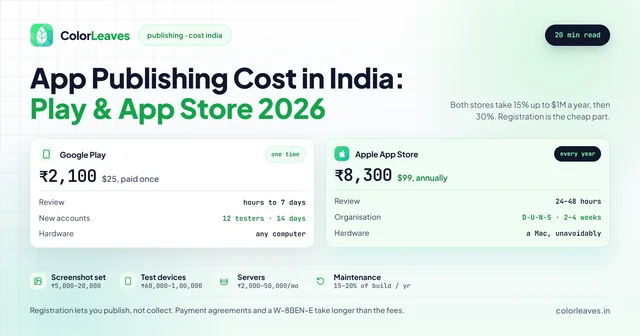
A Google Play developer account costs $25 (approximately ₹2,100) as a one-time payment (Google). Pay once, and the account stays active for life. No annual renewal, unlike Apple’s $99 yearly fee.
Here’s the part that trips up Indian developers: you have to pay with an internationally enabled debit or credit card. Google accepts Visa and Mastercard issued by Indian banks, but the card needs international transactions switched on. Plenty of people get a “payment declined” error and assume something’s broken. Usually it’s just that the card has overseas use disabled by default. Most banks let you toggle it on through their app in a minute.
| Item | Cost | Notes |
|---|---|---|
| Developer account registration | $25 (~₹2,100) | One-time, lifetime, unlimited apps |
| Screenshots (designer) | ₹5,000 to ₹20,000 | Optional, do-it-yourself is free |
| Feature graphic + icon | ₹3,000 to ₹10,000 | 1024x500 banner and 512x512 icon |
| Privacy policy hosting | ₹0 to ₹5,000 | Your own site works fine |
| Total setup | ₹5,000 to ₹25,000 | Most of it is optional design work |
The account fee is genuinely the only mandatory cost. Everything else is polish you can do yourself. For the full picture on store fees across both platforms, read our app publishing cost guide.
Compared with iOS this is remarkably cheap. The Apple Developer Program costs $99 every year, so across five years the gap is roughly ₹41,500 against ₹2,100. That should not drive which platform you build first, since Android or iOS first turns on where your users are and what they spend, but it does mean Android is the cheaper place to test whether an idea works at all.
Store assets are worth more attention than their cost suggests. Screenshots are the single biggest lever on install rate, and the first two carry most of the weight because that is what shows in search results. If you are paying for design work anyway, having the same person do the store assets costs little and usually pays for itself.
Individual vs Organization Account
When you sign up, Google asks you to register as either an individual or an organization. This choice sticks, and switching later is a pain, so get it right the first time.
| Feature | Individual Account | Organization Account |
|---|---|---|
| Cost | $25 one-time | $25 one-time |
| Published under | Your personal name | Company name |
| Verification | Government ID | D-U-N-S number + business documents |
| Verification time | 2 to 5 days | 5 to 10 business days |
| App limit | Unlimited | Unlimited |
| Best for | Freelancers, solo devs, indie | Companies, startups, agencies |
Running a registered business? Go with the organization account. Your apps publish under the company name, which reads as more credible to users, and Google has been extending organization accounts a little more trust during review.
The catch is the D-U-N-S number. It’s a free nine-digit business identifier from Dun & Bradstreet, and Google requires it for all new organization accounts. Getting one in India takes 2 to 4 weeks if you don’t already have it, so request it early. If you’re a solo developer or just want to ship fast, the individual account skips this entirely. You can always create a separate organization account later when the company is formally set up.
Identity Verification
Both account types need identity verification before you can publish anything. Google asks for:
- A government-issued photo ID (Aadhaar, passport, PAN card, or driving licence)
- Your legal name, exactly as it appears on the ID
- A contact address and phone number
- For organizations, business registration documents and the D-U-N-S number
Verification for individuals usually clears in 2 to 5 days. Organizations take longer because Google checks the business details against the D-U-N-S record. Make sure the name on your account matches your ID character for character. Mismatches are the single most common reason verification stalls.
You can start building your app and store listing while verification runs in the background. You just can’t push to production until it’s approved.
This is the argument for creating the account in week one of the project rather than at the end. Verification, the D-U-N-S number for organisations, and the 14-day closed test all run on somebody else’s clock, and none of them cost you a day if they overlap with development. Started in the final week, they stack into three. Put account setup on the plan alongside everything else, which our MVP costing guide assumes when it talks about shipping a first version in two to three months.
The Closed Testing Requirement for New Accounts
This is the rule that catches almost every first-time publisher in 2026.
Google now makes new personal developer accounts run a closed test before they can publish to production. The requirements:
- Add at least 12 testers by their email address
- Those testers must opt in and actually install your app
- The test must run for a minimum of 14 consecutive days
- Only after that window closes can you apply for production access
The policy started in late 2023 and Google has enforced it harder through 2025 and 2026 to cut down on spam and low-effort apps. It applies to new personal accounts. Organization accounts and existing accounts that already have production access are treated differently, but if you’re setting up fresh as an individual, build this two-week buffer into your app development timeline right now.
A practical tip: start collecting tester emails the moment your app reaches QA. You don’t need the final version. You can keep pushing updates to the closed test track all through the 14 days, so testers can be on a slightly rough build while you polish. Friends, family, and colleagues count, as long as they genuinely opt in and install. Twelve real testers, not twelve fake addresses, because Google checks for actual installs.
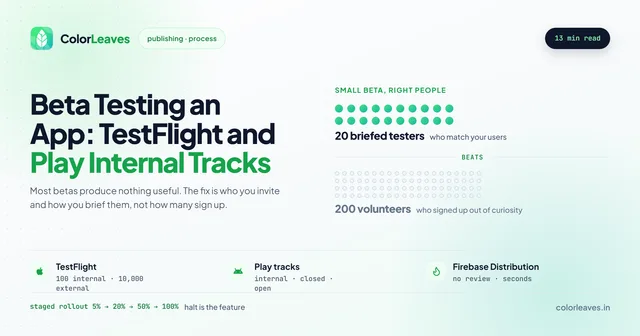
Since you are running a test anyway, run a useful one rather than a compliance exercise. Twelve people you brief properly will find more than a hundred who install and forget, and our guide to beta testing on Play internal tracks and TestFlight covers how to get feedback worth acting on. Recruit testers whose phones resemble your actual users’ phones rather than whoever is nearest, which for an Indian audience means budget Android hardware a few years old, as our piece on device fragmentation explains.
The Signing Key, Which Matters More Than Any of This
Buried under “app signing setup” is the single most consequential decision in this whole process.
Every Android app is signed with a cryptographic key, and Google will only accept an update signed with the same key as the original. Lose that key and you cannot update your app. Not with a support ticket, not by proving ownership. You publish a new listing under a new package name and start again from zero installs, zero reviews and zero ranking history.
Play App Signing solves this and you should enable it. Google holds the app signing key and you keep an upload key, so if the upload key is lost it can be reset. Turn it on when you create the app, because retrofitting it later is more work than it sounds.
Then the ownership question. If your app is published under a development partner’s Play Console, they hold the account and, depending on setup, the keys. That means the listing, the install base, the ratings history and the right to ship an update belong to them, and switching vendors becomes a negotiation rather than a decision. Our guide to who owns your code covers this alongside the repository and the cloud accounts, and the contract checklist covers the clause that prevents it. Register the Play Console in your company’s name before development starts. It costs $25 either way and it is a ten minute job at the beginning.
Setting Up to Get Paid
Registering lets you publish. It does not let you collect money.
If you plan to charge for the app or sell anything through in-app purchase or subscriptions, you need a linked payments profile with your bank details and tax information. For an Indian entity that means GST details and, depending on where your buyers are, tax forms for foreign earnings. It is not difficult and it does take longer than expected when somebody starts it the week of launch.
Worth knowing what actually requires it. Digital goods sold inside the app go through Google Play Billing, and Google takes 15 percent on the first million dollars a year and 30 percent above that. Physical products and real-world services do not. If you are building an ecommerce app that ships things to people, you use a normal payment gateway and Google takes nothing.
Account Suspension Is Google’s Distinctive Risk
Worth understanding because it differs from Apple in a way that matters.
Apple mostly rejects submissions. Google is comparatively more willing to act at the account level: its 2025 safety reporting cites 80,000 developer accounts banned and 1.75 million apps blocked from publishing. Policy violations, repeated infringements, or a pattern Google’s systems read as abuse can take down the account rather than the release.
Two implications. First, read the policies before you build features that skirt them, particularly around data collection, permissions and anything resembling a loan product, since Google’s financial services policies in India are strict. Second, an account holding several clients’ apps is a shared point of failure, which is one more argument for your app living in an account you control rather than an agency’s.
If a suspension happens, there is an appeal process and it is slow. Prevention is the entire strategy here.
Creating Your App and Store Listing
Once your account is live, you create the app inside the Play Console. The flow goes like this:
- Click Create app and set the default language, app name, and whether it’s an app or a game
- Choose free or paid (you can’t switch a paid app to free later, so think this through)
- Fill out the store listing
- Complete the compliance forms (content rating, data safety, target audience)
- Upload your signed app bundle
- Run the closed test if you’re a new account
- Submit for production review
Your store listing is what convinces people to tap install. Get these assets ready before you start:
| Asset | Spec | Notes |
|---|---|---|
| App title | Up to 30 characters | Include your main keyword naturally |
| Short description | Up to 80 characters | Shows in search results |
| Full description | Up to 4,000 characters | Write for humans, weave in keywords |
| Screenshots | 2 minimum, 8 recommended | Show your best screens first |
| Feature graphic | 1024 x 500 pixels | Banner at the top of the listing |
| App icon | 512 x 512 pixels | PNG, no transparency |
| Promo video | YouTube URL (optional) | Lifts conversion noticeably |
One thing to note on the upload itself: Google only accepts the Android App Bundle (AAB) for new apps now. The old APK format won’t go through for fresh listings. Your build also has to target a recent Android API level. As of 2026, new apps must target at least API level 34, and Google bumps this requirement every year.
Neither of these is affected by how the app was written. A Flutter or React Native build produces the same bundle a native Kotlin one does, and the target API level applies identically. What does differ is how quickly your team can respond when Google raises the requirement, since cross-platform projects sometimes wait on a framework release before they can bump it. Worth asking about if you are choosing a stack.
Content Rating (IARC)
Every app has to complete the IARC content rating questionnaire. IARC stands for International Age Rating Coalition, and the system assigns your app an age rating based on your answers. It takes about 5 to 10 minutes.
You answer questions about violence, language, sexual content, gambling, and similar themes. The system then generates ratings for different regions automatically. Answer honestly. If your declared rating doesn’t match what’s actually in the app, Google can suspend the listing, and getting reinstated is far more painful than just filling the form correctly the first time.
The Data Safety Form
The data safety form is where you declare what user data your app collects, why, and whether you share it with third parties. It shows up on your store listing as the “Data safety” section that users read before downloading.
You’ll declare things like:
- Whether you collect personal info (name, email, phone, location)
- Whether data is encrypted in transit
- Whether users can request deletion of their data
- Which third-party SDKs (analytics, ads, crash reporting) touch user data
Google cross-checks these declarations against your app’s actual behavior. If you say you don’t collect location but your code requests location permission, that’s a rejection. Be accurate. If your app uses Firebase, an ad network, or any analytics tool, those count as data collection and have to be declared. This form trips up more developers than the content rating because people forget that their analytics SDK is quietly gathering data.
Ask your development team for a full dependency list before filling this in, and ask who is allowed to add one. An SDK pulled in during a sprint you never reviewed is still your declaration to make, and it is a quieter version of the problems in our list of offshore risks. The same declarations feed India’s Digital Personal Data Protection Act obligations, so getting this right is not only a store requirement.
Apps aimed at children carry additional rules under Google’s Families policy, which restricts what data you may collect and which SDKs you may use. If you are building anything for students or under-18s, our education app development page and education app cost guide cover what that does to the build.
Review Timeline
After you submit to production, Google reviews the app. For most apps the review runs a few hours to 7 days. New developer accounts and apps in sensitive categories take longer because they get extra scrutiny, which in practice means anything financial, anything medical, and anything aimed at children. Both of the first two carry regulatory requirements beyond the store’s own, covered in our fintech and healthcare guides.
Updates to an already-published app move much faster, often within a few hours. If your app gets rejected, Google tells you why, you fix the issue, and you resubmit. You don’t lose your $25 fee, and there’s no penalty for resubmitting.
Stack the timelines and a brand new personal account looks like this: 2 to 5 days for verification, 14 days for the closed test, then up to 7 days for the production review. Worst case, three weeks from account creation to a live app. An existing account skips the first two and can be live in a day or two.
That gap is a decent reason to work with a team that already publishes regularly, since an established organisation account skips most of it. It is also a reason to be clear about whose account you end up on, which is covered above. If you are weighing whether to build in-house or engage a firm, our guide to hiring app developers in India covers the arrangements and what it costs to hire covers the rate bands.
Frequently Asked Questions
How much does a Google Play Console developer account cost in India?
A Google Play developer account costs $25 (about ₹2,100) as a one-time fee (Google). There’s no annual renewal, and one account lets you publish unlimited apps. You’ll need an internationally enabled debit or credit card to pay, since Google bills the fee in USD.
How much does it cost to publish an Android app on the Play Store?
Publishing an Android app on the Play Store costs $25 (about ₹2,100), a one-time developer account fee with no renewal. That single payment covers unlimited apps, so the Android app publish cost after your first app is effectively zero. Store assets and a privacy policy page are optional extras, not required charges.
Do I need a company to create a Play Console account?
No. Individual accounts let you publish under your personal name without registering a business. You only need an organization account if you want apps published under a company name, and that requires a D-U-N-S number plus business documents. Many developers start as individuals and switch to an organization account once the company is formally set up.
What is the 12-tester rule on Google Play?
New personal developer accounts must run a closed test before publishing to production. You need at least 12 testers who opt in and install your app, and the test has to run for a minimum of 14 consecutive days. Google brought this in to reduce spam apps. Start gathering tester emails while your app is still in QA so the clock starts early.
How long does Play Console verification take?
Identity verification for an individual account usually clears in 2 to 5 days. Organization accounts take 5 to 10 business days because Google verifies the D-U-N-S number and business details. Make sure your account name matches your government ID exactly, since mismatches are the most common cause of delays.
Can I publish APK files on Google Play in 2026?
No. New apps must be uploaded as an Android App Bundle (AAB), not an APK. Your build also has to target a recent Android API level, which is at least API level 34 as of 2026. Google raises the minimum target level every year, so check the current requirement before you build your release.
How long is the Play Store review for a new app?
Most apps clear review in a few hours to 7 days. New accounts and apps in sensitive categories like health or finance take longer. If you’re a brand new personal account, factor in verification (2 to 5 days) and the 14-day closed test on top of the review time, which can mean up to three weeks total from signup to launch. For a full cost and timeline picture, see our app development cost guide.
Need a Hand Getting Your App Live?
Account setup looks straightforward written out like this. In practice it’s a string of small things that quietly eat days: a card that won’t process the fee, a verification stuck on a name mismatch, a data safety form that doesn’t match your code, or finding out about the 14-day test the week you planned to launch.
At Color Leaves, publishing is part of our Android app development work. We’ve shipped 50+ apps to the Play Store from Pune, including StockGenie, a finance app that went through the stricter review path and holds a 4.5 rating. We set up developer accounts, sort out verification, prepare store listings, run the closed test, and manage the review back-and-forth so you don’t have to learn it all the hard way. Got an Android app ready to ship, or one still in the works? Talk to our team and we’ll get it live the right way.
If you are choosing who does this rather than doing it yourself, our guide to choosing a development company covers what to ask, and hiring an app developer in Pune covers the local market. Ask any candidate whose Play Console their last client’s app lives in. It is a short question and the answer is revealing.
Publishing to Both Stores
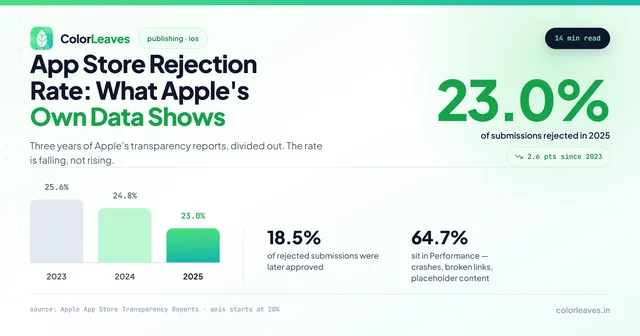
Play Console is the friendlier of the two by some distance. Google reviews mostly by automation and turns around in hours, where Apple takes days and rejects roughly a quarter of what it receives. Budget for that gap if you are launching on both at once, and submit to Apple first, since iOS is the critical path. Our breakdown of why apps get rejected covers what Apple’s reviewers check, and a good deal of it is worth doing on Android too even though nobody will stop you.
Worth stating a caveat about that comparison. Nobody can honestly quote a Play rejection rate, because Google publishes how many apps it blocks and never how many it reviewed. The widespread impression that Play is the easier gate matches our experience; it just is not a number anybody can source.
If you are building for both platforms, cross-platform development covers them from one codebase, and Flutter versus React Native settles which framework. Either way the store setup above is unchanged, since the account and the compliance forms have nothing to do with how the app was written.
After the Account Exists
Registration is the easy part. What follows is the app signing setup, the Data Safety form, staged rollouts, and the target API level Google raises every year whether or not it suits your roadmap. Miss that deadline and your app stops reaching new users on current devices, which is why every Android app needs at least one compliance release a year before a single feature is added. Budget for it as ongoing maintenance or arrange a defined support arrangement rather than treating it as a surprise.
Use the staged rollout when you release. Ship to 5 percent, watch the crash rate, then raise it. Both the ability to pause and the Android vitals data behind the decision come free with the account, and vitals is the most useful screen in the Play Console: crash and ANR rate per device model from real installs, with Google’s bad behaviour thresholds at 1.09 percent for crashes and 0.47 percent for ANRs. Cross either and your store ranking suffers, which turns a quality problem into a distribution one.
One decision is worth making before any of that: whose Play Console the app lives in. Publish under an agency’s account and the listing, the install base, the ratings history and the right to ship an update all belong to them. Ours go in your name. Our Android app development in India page covers how we handle releases and device fragmentation, and hiring Android app developers covers putting a Kotlin engineer inside your own team instead. If iOS is coming too, cross-platform development is usually cheaper than two native builds.