“How long will it take to build my app?” is the first thing most clients ask. The real answer runs anywhere from two months to a year, depending on how much the app has to do. That spread isn’t much help when you’re trying to lock a launch date or set a budget, so let’s get specific.
This guide breaks down realistic timelines based on app complexity and explains the factors that influence development duration. Drawing from our experience building 50+ apps at Color Leaves, we’ll give you practical expectations for your project.
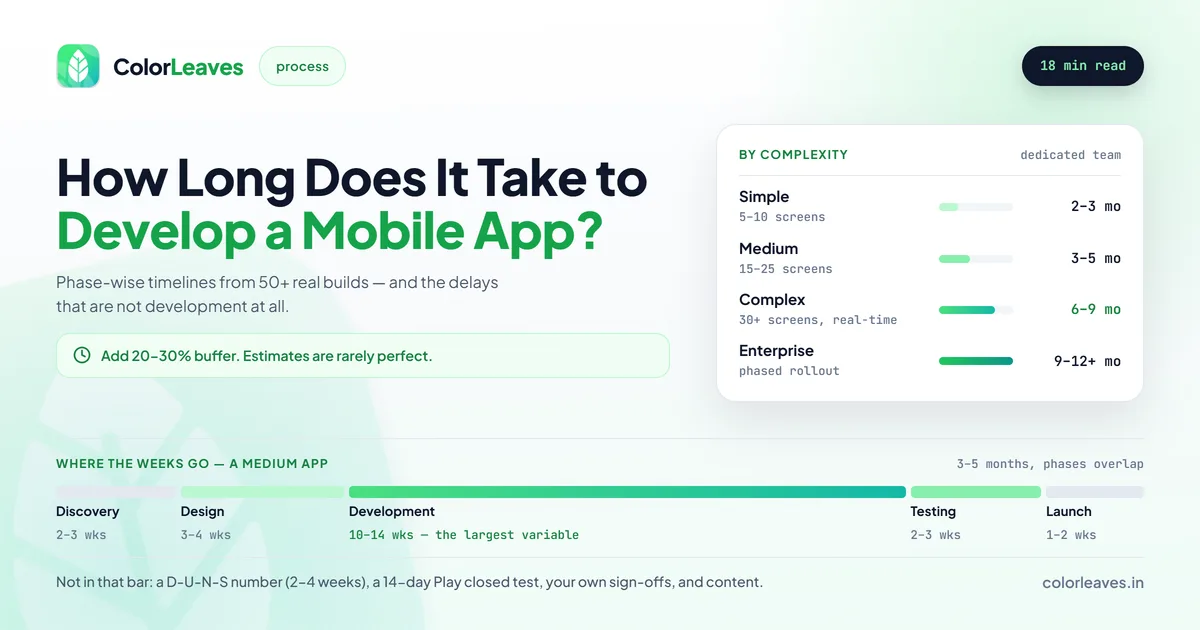
Key Takeaway: A simple app takes 2 to 3 months to build, a medium app 3 to 5 months, and a complex app 6 to 9 months. Large enterprise solutions can run 9 to 12 months or more, depending on features and team size.
Quick Timeline Overview
Here’s a general framework based on app complexity:
| App Type | Development Time | Example |
|---|---|---|
| Simple | 2-3 months | Basic utility app, simple e-commerce |
| Medium | 3-5 months | Social app, on-demand service |
| Complex | 6-9 months | Fintech app, healthcare platform |
| Enterprise | 9-12+ months | Large-scale enterprise solution |
These timelines assume a dedicated development team and don’t include major scope changes mid-project. They also assume the app is the only thing on the critical path, which it usually isn’t. There’s a section further down on the delays that aren’t development, and on most projects those account for more slippage than the engineering does.
Cost tracks complexity the same way. Our app development cost guide for India gives the equivalent ranges by feature, and the two numbers move together closely enough that a quote promising a complex build on a simple-app schedule is usually mispriced as well as misjudged.
Factors That Affect Development Time
Several variables influence how long your app will take to build:
1. Feature Complexity
The number and complexity of features have the biggest impact on timeline. Consider:
Simple Features (days to implement):
- User registration/login
- Basic profile management
- Simple forms and data entry
- Static content display
Medium Features (1-2 weeks each):
- Social login integration
- Push notifications
- Basic payment integration
- Search functionality
- Image upload and management
Complex Features (2-4 weeks each):
- Real-time chat
- Video streaming
- Complex payment flows
- Machine learning integration
- Custom animations
- Offline functionality with sync
2. Platform Choice
Your platform decision affects both timeline and resources:
Single Platform (iOS or Android): Baseline timeline
Cross-Platform (React Native/Flutter): Similar to single platform timeline but delivers both iOS and Android simultaneously. Learn more about cross-platform development.
Native for Both Platforms: Roughly double the development effort, as each platform requires separate development. See our Android and iOS development services.
3. Design Requirements
UI/UX design significantly impacts timeline:
Using standard components: Faster development Custom UI with unique interactions: Adds 2-4 weeks Complex animations and transitions: Adds 1-3 weeks Accessibility requirements: Adds 1-2 weeks
Investing in professional UI/UX design early in the process can actually shorten overall timelines. Well-designed wireframes and prototypes reduce confusion during development, cutting down on rework and back-and-forth revisions.
4. Backend Complexity
Apps rarely exist in isolation. Backend requirements affect timeline:
Using existing APIs: Minimal additional time Simple backend (auth, basic data): 2-4 weeks Medium backend (business logic, integrations): 4-8 weeks Complex backend (real-time, ML, heavy processing): 8-16 weeks
5. Third-Party Integrations
Each integration adds time:
- Payment gateways: 1-2 weeks
- Social media APIs: 3-5 days each
- Maps and location: 1-2 weeks
- Analytics setup: 2-3 days
- CRM/ERP integration: 2-4 weeks
- Custom API integrations: Varies widely
6. Testing Requirements
Quality assurance can’t be rushed:
- Basic testing: Included in development time
- Thorough QA: Adds 2-3 weeks
- Security testing: Adds 1-2 weeks
- Performance testing: Adds 1 week
- User acceptance testing: 1-2 weeks
Timeline by App Complexity
Let’s break down what each complexity level looks like in practice.
Simple Apps (2-3 Months)
Characteristics:
- 5-10 screens
- Basic user authentication
- Standard UI components
- Limited backend requirements
- Few third-party integrations
Example Apps:
- Basic e-commerce catalog
- Simple booking app
- Utility or calculator app
- Basic content/news app
- Simple fitness tracker
Typical Phase Breakdown:
- Discovery and planning: 1-2 weeks
- UI/UX design: 2-3 weeks
- Development: 6-8 weeks
- Testing and QA: 1-2 weeks
- App store submission: 1 week
Medium Complexity Apps (3-5 Months)
Characteristics:
- 15-25 screens
- User profiles with data persistence
- Custom UI elements
- Moderate backend logic
- Multiple third-party integrations
- Push notifications
Example Apps:
- Full-featured e-commerce app
- Social networking app
- On-demand service app (food delivery, ride-sharing)
- Fitness app with tracking
- Event management app
Typical Phase Breakdown:
- Discovery and planning: 2-3 weeks
- UI/UX design: 3-4 weeks
- Development: 10-14 weeks
- Testing and QA: 2-3 weeks
- App store submission: 1-2 weeks
Complex Apps (6-9 Months)
Characteristics:
- 30+ screens
- Advanced user management
- Complex business logic
- Real-time features
- Multiple user roles
- Extensive integrations
- Security-critical features
Example Apps:
- Banking and fintech apps
- Healthcare platforms
- Enterprise resource apps
- Marketplace platforms
- Complex logistics apps
Typical Phase Breakdown:
- Discovery and planning: 3-4 weeks
- UI/UX design: 4-6 weeks
- Development: 20-28 weeks
- Testing and QA: 4-6 weeks
- App store submission: 2 weeks
Enterprise Apps (9-12+ Months)
Characteristics:
- Large-scale user base
- Complex integrations with existing systems
- Multiple stakeholder requirements
- Extensive security and compliance needs
- Custom infrastructure
- Multi-region deployment
These projects require extensive planning and often involve phased rollouts rather than a single launch.
Development Phase Breakdown
Understanding each phase helps set realistic expectations:
Phase 1: Discovery and Planning
Duration: 1-4 weeks depending on complexity
Activities:
- Requirements gathering
- User research
- Technical feasibility analysis
- Architecture planning
- Resource allocation
- Timeline and milestone definition
Deliverables:
- Project requirements document
- Technical specification
- Project timeline
- Budget estimate
This phase is often underestimated but directly impacts project success. Rushing here leads to problems later. It is also the cheapest phase to change your mind in: a feature removed during discovery costs a conversation, while the same feature removed during development costs the build, the design and the testing that went into it. Our walkthrough of the development process covers what discovery should produce, and the test is whether somebody who was not in the room could build from it.
Phase 2: UI/UX Design
Duration: 2-6 weeks
Activities:
- User flow mapping
- Wireframe creation
- Visual design
- Prototype development
- Design review and iteration
Deliverables:
- Wireframes for all screens
- High-fidelity designs
- Interactive prototype
- Design system documentation
Good design takes time. Cutting this phase short results in apps that are difficult to use or require redesign during development.
Phase 3: Development
Duration: 6-28 weeks (largest variable)
Activities:
- Frontend development
- Backend development
- API integration
- Database setup
- Feature implementation
- Code reviews
Deliverables:
- Working application
- API documentation
- Source code repository
Development typically follows sprint cycles with regular demos. This allows for feedback and course correction.
Ask for an installable build at the end of each sprint rather than a demo of somebody’s simulator. A build on your own phone is the only progress report that cannot be written optimistically, and it also exercises the release pipeline early, which is where projects lose a week they did not plan for. The source code repository listed under deliverables should be in your own organisation from the first commit rather than transferred at the end, and who owns your code covers why that matters beyond convenience.
Phase 4: Testing and QA
Duration: 1-6 weeks
Activities:
- Functional testing
- UI/UX testing
- Performance testing
- Security testing
- Device compatibility testing
- Bug fixing
Deliverables:
- Test reports
- Bug-free application
- Performance benchmarks
Testing should run throughout development, not just at the end. Even so, full end-to-end testing still needs its own block of dedicated time.
Phase 5: Launch
Duration: 1-2 weeks
Activities:
- App store asset preparation
- Submission to app stores
- Review process handling
- Launch coordination
Deliverables:
- Published app
- Store listings
- Launch documentation
Apple’s review process typically takes 1-3 days. Google Play is usually faster. Budget for potential rejections and resubmissions.
Ways to Reduce Development Time
While quality shouldn’t be compromised, there are legitimate ways to accelerate development:
Start with an MVP
Build the minimum viable product first:
- Identify core features that deliver value
- Defer nice-to-have features to future versions
- Launch sooner and iterate based on user feedback
An MVP can often be delivered in 40-60% of the time a full-featured app would take. Our MVP costing guide covers scoping one that answers a question rather than just shipping smaller, and the MVP development page covers how those builds run. The discipline that makes it work is writing down, before you start, what result would mean continue and what would mean stop.
Use Cross-Platform Development
Building with Flutter or React Native lets you target both iOS and Android from a single codebase, potentially saving months of development time. Flutter versus React Native covers which suits your team, and choosing a mobile platform covers the wider question of whether cross-platform is right for you at all. The saving compounds after launch too, since every subsequent feature also gets built once rather than twice.
Reuse What Already Exists
Don’t reinvent the wheel:
- Use proven authentication services (Firebase Auth, Auth0)
- Integrate existing payment solutions
- Utilize backend-as-a-service where appropriate
- Use established UI component libraries
Clear Requirements from Day One
Scope creep is the biggest timeline killer. Thoroughly document requirements before development begins and manage changes through a formal process.
Dedicated Team with Good Communication
A team that works together regularly moves faster than one assembled for a single project. Regular communication prevents misunderstandings that cause rework. If you’re working with an offshore team, get the overlap hours written down as a number rather than a promise, because a blocking question asked at 4pm your time and answered the next afternoon turns a one-day task into a week when it happens twice. Our guide to hiring app developers in India covers what to ask for, and hiring a dedicated developer covers how that arrangement runs.
The Delays That Are Not Development
Worth a section because these sit outside the schedule everyone plans, and they are the ones that move launch dates.
Store account setup. An Apple organisation account needs a D-U-N-S number, which takes two to four weeks to obtain in India. A new personal Google Play account must run a 14-day closed test with at least 12 testers before it can publish publicly. Started in week one alongside development, both cost nothing. Started at the end, they add three weeks to a ten-week project. Our Apple Developer account and Play Console guides cover the steps.
Your own approvals. Design sign-off, content, legal review of a privacy policy, a decision about pricing. Each of these can sit for a week waiting on somebody, and they are entirely within your control. Agree who signs off what before development starts.
Third-party access. Payment gateway onboarding, an API key from a partner, a merchant account, access to your own ERP. These run on other people’s timetables and are the most common cause of a phase running long for reasons nobody on the project can fix.
Content. Product photos, course material, copy, translated strings. An app with placeholder content is not shippable, and content production is frequently a bigger job than anyone estimated.
App store review. Covered below, and worth a week of slack rather than a day.
The pattern in all five is that they are not engineering work, so they get left out of engineering estimates. Add them to the plan explicitly and the schedule stops slipping for reasons that surprise everyone.
Common Timeline Mistakes
Avoid these pitfalls that derail project timelines:
Underestimating Design Time
Design is not just “making things pretty.” Good UX design requires research, iteration, and testing. The specific thing that overruns is revision rounds, because design is the easiest part of a project to iterate on forever. Agree how many are included and what a round means before design work starts, and expect two rounds plus a final polish to be a normal shape. Budget adequate time.
Ignoring Backend Complexity
Mobile apps are often the visible tip of a larger system. Backend development, API design, and infrastructure setup require significant effort.
Assuming Linear Progress
Development rarely proceeds in a straight line. Testing reveals bugs. Integrations have unexpected issues. User feedback requires changes. Build buffer time into your schedule.
Skipping Testing
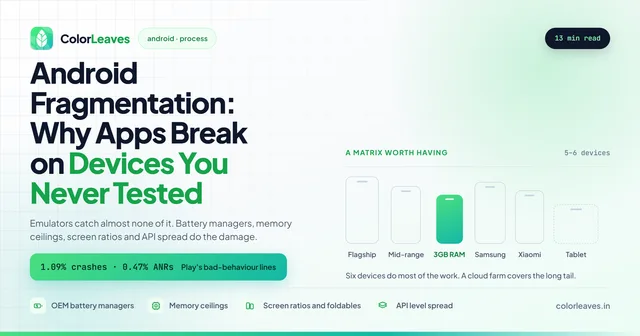
“We’ll test later” is how you ship bugs and collect one-star reviews. Testing time isn’t optional, it’s part of the build. The part most often cut is testing on real devices rather than emulators, and that is where the expensive problems hide: manufacturer battery managers killing background work, memory ceilings on budget hardware, layouts breaking on unusual screen ratios. Our piece on Android device fragmentation covers building a matrix of five or six devices that does most of the work, and 15 to 25 percent of Android engineering effort for verification is the honest figure.
Scope Creep
Adding “just one more feature” repeatedly can double your timeline. Use version planning to defer non-essential features to future releases.
Planning Your Project Timeline
Here’s how to approach timeline planning realistically:
Step 1: Define Your MVP
List all desired features, then ruthlessly prioritize:
- Must-have for launch
- Should-have (add in v1.1)
- Nice-to-have (future roadmap)
Step 2: Get Expert Input
Consult with a development team before finalizing timelines. They can identify technical complexities you might not anticipate.
Step 3: Add Buffer Time
Add 20-30% buffer to your estimated timeline. This accounts for unexpected challenges, feedback iterations, and the reality that estimates are rarely perfect.
Step 4: Plan for Post-Launch
Your timeline shouldn’t end at launch. Budget time and resources for:
- Bug fixes
- Performance optimization
- User feedback implementation
- OS update compatibility
Post-launch is where ongoing app maintenance becomes critical. Having a maintenance plan ready before launch ensures you can respond quickly to issues and keep your app healthy from day one. Budget 15 to 20 percent of the build cost per year, which our maintenance cost guide breaks down, and know that at least one compliance release a year is mandatory because Google raises the target API level annually whether or not it suits your roadmap.
What Affects App Store Review Time?
After development, app store reviews add to your timeline:
Apple App Store:
- Typical review: 1-3 days
- Complex apps or first submissions: Up to 1 week
- Rejection and resubmission: Adds 3-7 days per cycle
Google Play Store:
- Typical review: Several hours to 2 days
- New developer accounts: May take longer
- Policy violations: Adds days for resolution
Plan your launch date with review time in mind, and have someone available to respond quickly to any issues.
Budget a review cycle rather than a review. Apple’s own transparency reports put the rejection rate at roughly one in four submissions, and about a third of rejections carry a second problem that only surfaces on resubmission, so fixing the one thing the reviewer mentioned is often not enough. Weight the good case against the bad and the expected cost lands near three days with a tail past a week. A plan allocating two days is planning for the median and ignoring the distribution.
The good news is that most of it is avoidable. Two thirds of rejections sit in Apple’s Performance category, which is largely crashes and incomplete information rather than judgement calls, and our guide to why apps get rejected covers the pre-submission checks that catch them. Running the build through TestFlight or a Play internal track first surfaces guideline problems days before they can cost you a cycle, since TestFlight builds go through a lighter review of their own.
Health, finance and kids category apps sit longer than the published averages, so add a week if you are in one of them.
Working with Color Leaves
At Color Leaves, we’ve refined our development process over 10+ years and 50+ successful app launches. Our approach includes:
- Detailed discovery phase to prevent surprises later
- Bi-weekly demos so you see progress throughout
- Parallel workstreams where design and development overlap efficiently
- Integrated testing throughout development, not just at the end
- 3 months free post-launch support included with every project
For a worked example, our StockGenie case study breaks down a build that reached the Play Store in two months with four people, and is honest about what had to be cut to hit that.
If you’re planning a mobile app project and want realistic timeline guidance, contact us for a free consultation. We’ll review your requirements and provide a detailed estimate based on your specific needs.
Related Guides
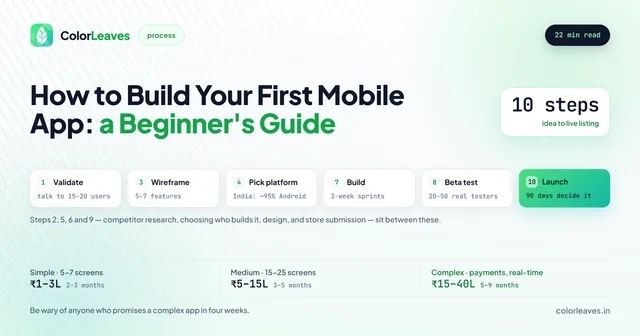
Timelines and costs go hand in hand, so see our complete app development cost breakdown for India in 2026, and the city by city comparison if you are weighing quotes from different places. If you’re building a shopping app, our e-commerce app development guide has specific timelines by app type, and the on-demand, fintech and healthcare guides do the same for categories where regulation or logistics stretch the schedule. New to app development? Start with our step-by-step guide for beginners. For a detailed look at each phase, read our complete mobile app development process guide.
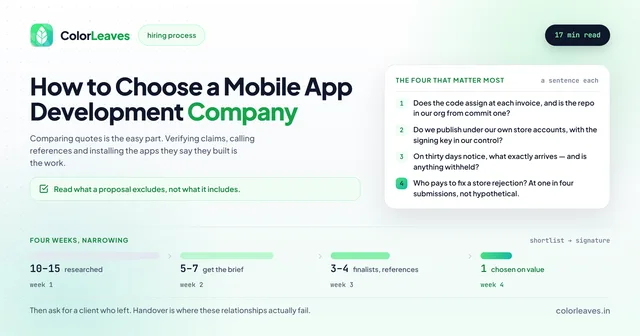
If you are still choosing who will do the work, how to choose a development company covers what to ask, and one of the more useful questions is how they arrived at the timeline they quoted. An estimate with no assumptions attached is a warning rather than confidence.
Frequently Asked Questions
How long does it take to develop a mobile app?
A simple app takes 2 to 3 months to develop, a medium app 3 to 5 months, and a complex app 6 to 9 months. Large enterprise apps can run 9 to 12 months or more depending on features and team size.
Can I get an app built in 1 month?
A very simple app might be achievable in 4-6 weeks, but most meaningful applications require at least 2-3 months. Extremely short timelines often result in quality compromises.
Why do different companies quote different timelines?
Variations come from different team sizes, development approaches, included features, and quality standards. Always compare quotes based on detailed scope documents, not just duration.
What’s the difference between development time and project time?
Development time is actual coding hours. Project time includes design, planning, reviews, feedback cycles, testing, and launch preparation. Project time is always longer than pure development time.
Should I outsource or build an in-house team?
For most businesses, outsourcing to an experienced agency is faster and more cost-effective for app development. Building an in-house team makes sense for companies with ongoing, long-term development needs.
How do I know if my timeline estimate is realistic?
If a quote seems too good to be true, it probably is. Get multiple estimates, ask for detailed breakdowns, and check references for similar projects the team has completed. A useful arithmetic check: divide the quoted price by the timeline and see whether the implied team size is plausible at Indian rates, which our cost to hire developers guide sets out. A proposal describing six people on a budget that supports one and a half is telling you something.
Does the timeline change by industry?
The five phases hold, but the weight shifts. Regulated categories front-load far more into planning because compliance shapes the architecture, and both fintech and healthcare builds routinely spend longer in discovery and longer again in testing and audit. Categories with heavy logistics like on-demand run longer in development because they are really three connected apps rather than one.
Can we hire locally to move faster?
Sometimes, and the gain is in feedback speed rather than in raw development. A question asked at 3pm answered at 3pm rather than the next morning compounds over a project. Hiring an app developer in Pune covers that market, and the portfolio shows the kind of schedules we work to.
What if my requirements change during development?
Change is normal, but it affects timeline. A good development partner will help you assess the impact of changes and make informed decisions about what to include versus defer.