Choosing the right mobile app development platform is one of the most important decisions you’ll make for your project. Pick the wrong one and you could end up spending double the money, missing your launch date, or building something that doesn’t perform well on your users’ phones.
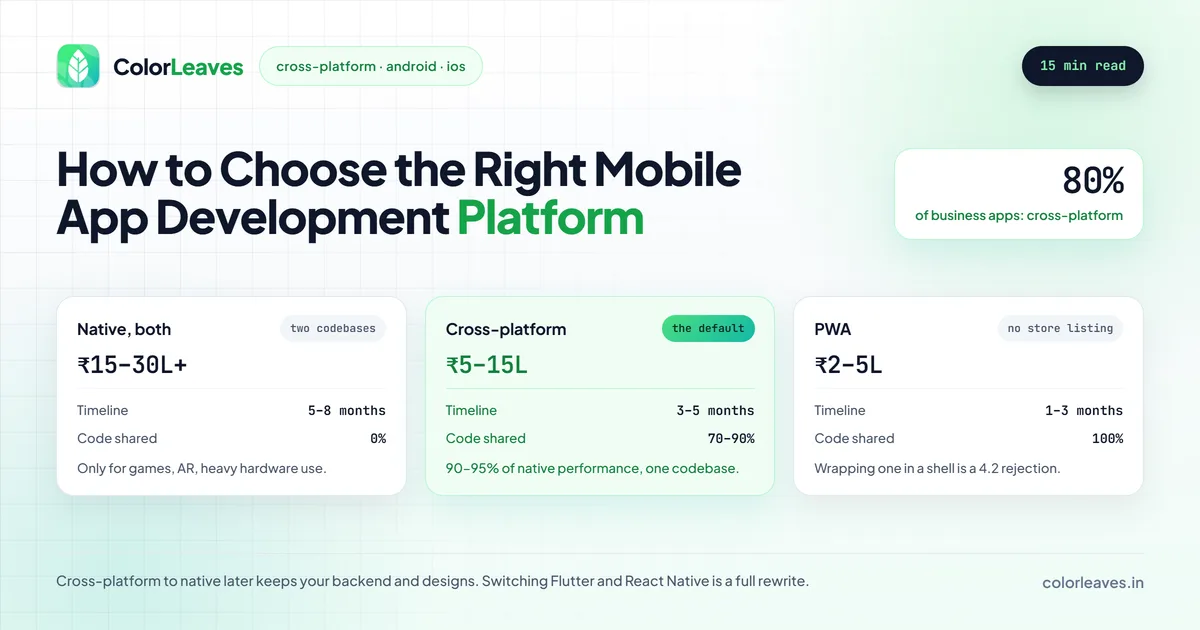
Key Takeaway: Cross-platform (React Native or Flutter) suits about 80% of business apps, balancing cost, speed, and quality. Choose native only for games, AR, or heavy hardware use. Pick a PWA only when budget is very tight and you can skip the app stores.
We’ve helped 50+ businesses in Pune make this exact decision, so we know the confusion that comes with it. This guide breaks down your options in plain language so you can figure out what actually makes sense for your situation.
Two things worth knowing before you read on. This decision is not as permanent as it feels, and it constrains who you can hire more than most people expect. Both are covered below, and both change the answer more often than the performance benchmarks everyone argues about.
Your Three Main Options
When you’re building a mobile app, you have three paths to choose from. Each comes with trade-offs, and there’s no single “best” option that fits everyone.
1. Native Development
Native means building separate apps for Android and iOS using each platform’s own tools and languages.
For Android:
- Languages: Kotlin (recommended), Java
- IDE: Android Studio
- Full access to every Android feature: camera, GPS, sensors, notifications, the lot
For iOS:
- Languages: Swift (recommended), Objective-C
- IDE: Xcode
- Full access to Apple’s ecosystem: ARKit, HealthKit, Apple Pay, and every new iOS feature
The big advantage of native? Performance. Your app will feel snappy and natural because it’s built specifically for that platform. The downside? You’re building two separate apps, which means roughly double the development time and cost.
Best for: Apps that need top-notch performance, like games, AR/VR, or anything with heavy animations and complex graphics.
2. Cross-Platform Development
Cross-platform frameworks let you write your code once and run it on both Android and iOS. You’re basically sharing most of your codebase between platforms.
Popular Frameworks:
- React Native: JavaScript/TypeScript, backed by Meta. A good fit if your team already knows JavaScript.
- Flutter: Dart, backed by Google. Known for sharp UIs and smooth animations.
- .NET MAUI: C#, backed by Microsoft, and the successor to Xamarin. Worth considering only if you are already a .NET shop.
- Kotlin Multiplatform: Kotlin, backed by JetBrains and Google. Shares business logic while each platform keeps its own UI. A middle path that has matured considerably.
In practice the choice is between the first two for almost everybody. Our comparison of Flutter and React Native covers that decision in detail, and the cross-platform development overview covers what either team looks like.
You typically share 70-90% of your code between platforms, which saves a lot of time and money. The trade-off is that some platform-specific features can be trickier to implement, and performance might not match a fully native app for demanding use cases.
Best for: Most business apps, startups, MVPs, e-commerce apps, and anything where you want to reach both Android and iOS users without spending twice the budget.
3. Progressive Web Apps (PWAs)
PWAs are basically websites that look and behave like apps. Users can “install” them from the browser, and they can work offline too.
They’re the cheapest option, but they come with real limitations. No access to the app stores (so users can’t find you on Google Play or the App Store), limited access to phone hardware, and the experience just doesn’t feel as polished as a real app.
One trap worth naming. Teams sometimes wrap a PWA in a thin native shell to get a store listing, and Apple rejects that under guideline 4.2, minimum functionality. An app that does nothing a website could not is the most common rejection there is, and our guide to why apps get rejected covers what counts as genuine native capability. If you want to be on the stores, budget for something that deserves to be.
Best for: Content-heavy apps like news readers or blogs, businesses testing an idea on a tiny budget, or when you need something live in a few weeks.
Side-by-Side Comparison
Here’s a quick look at how these three approaches stack up:
| Factor | Native (Android + iOS) | Cross-Platform | PWA |
|---|---|---|---|
| Development Cost | ₹15-30+ lakhs (both platforms) | ₹5-15 lakhs | ₹2-5 lakhs |
| Timeline | 5-8 months | 3-5 months | 1-3 months |
| Performance | Best possible | Very good (90-95% of native) | Good for simple apps |
| Code Sharing | 0% (separate codebases) | 70-90% shared | 100% (one codebase) |
| App Store Presence | Yes | Yes | No (or limited) |
| Access to Device Features | Full | Most features | Limited |
| Maintenance Cost | Higher (two codebases) | Lower (one codebase) | Lowest |
| Look & Feel | 100% platform-native | Near-native | Web-like |
How Much Does Each Approach Actually Cost?
Let’s talk money, because that’s usually the first question everyone asks.
Native development for both platforms is the most expensive route. You need two separate development teams (or one team that knows both Kotlin/Swift), and you’re essentially paying for two apps. For a medium-complexity app in Pune, expect to spend ₹15-30 lakhs or more for both platforms combined. Maintenance is also higher because every update needs to be done twice.
Cross-platform development typically costs 30-40% less than building two native apps. A similar medium-complexity app would run ₹5-15 lakhs. You save on both the initial build and ongoing maintenance because most of the code is shared.
PWAs are the budget option at ₹2-5 lakhs. Just remember you’re getting a web app, not a native one.
Here’s a rough breakdown by budget:
- ₹1-5 lakhs: Go with a PWA, or build a cross-platform MVP with just the core features
- ₹5-10 lakhs: Cross-platform is the sweet spot. You can build a solid app for both platforms
- ₹10-15 lakhs: Cross-platform with premium features, or native for a single platform
- ₹15+ lakhs: Native for both platforms, or a feature-rich cross-platform app
Those figures are the build. The gap widens afterwards, because two native codebases means every fix, every OS update and every annual compliance release happens twice. Budget 15 to 20 percent of the build cost per year either way, which our maintenance cost guide breaks down, and note that the native version of that number is calculated on a larger build to begin with. Over three years the difference is usually larger than the difference at launch.
Timelines follow the same pattern, and our development timeline guide covers where the weeks go in each case. If budget is the binding constraint, scoping deliberately as an MVP beats choosing a cheaper technology, because a well-built small app outperforms a badly built large one on every measure that matters. Our MVP development page covers how those builds run.
What This Decision Costs to Reverse
People treat this as permanent and it is not, which should take some of the pressure off.
Cross-platform to native is the common direction and the least painful. Your backend, your API contracts, your designs and your product decisions all survive. You are rewriting the client, which is real work but is a fraction of building from nothing, and you usually do it one platform at a time after the product has proven itself. Plenty of well-known apps started cross-platform and went native later.
Native to cross-platform happens too, generally when maintaining two codebases stops being affordable. Same story: the expensive part, knowing exactly what the app should do, is already done.
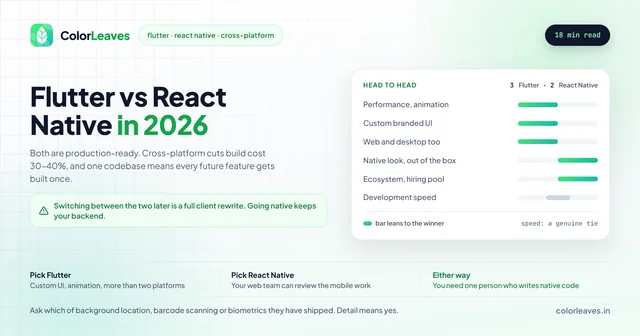
Switching between React Native and Flutter is the expensive one, because it is a full rewrite of the client with none of the consolation of a platform upgrade. Worth getting right first time, which is the one place in this decision to spend real thought.
PWA to anything is nearly a fresh start on the client side, though the web app can keep running while you build.
The practical conclusion is to optimise for shipping something real rather than for a hypothetical future. The information you need to make this decision properly mostly arrives after launch.
The Constraint Nobody Mentions: Who You Can Hire
The technology decision is also a hiring decision, and in India the pools are not the same size.
Android and Kotlin is the deepest pool by some distance, so those roles fill fastest and price most competitively. Hiring Android developers in India covers that market. Native iOS and Swift is smaller and prices higher, because the domestic install base is smaller and the talent concentrates around firms serving overseas clients, which our page on hiring iOS developers covers.
React Native benefits from every JavaScript developer being a partial candidate, so it is straightforward to staff and has a genuine advantage for anyone with a React web team already: your own engineers can review the mobile work. That changes the risk of an outside hire more than any framework benchmark, and it is covered on our page for hiring React Native developers.
Flutter benches in India run deeper than most Western teams expect, largely because Google pushed it hard through the Indian training market, so those roles fill faster here than they would in the US or UK.
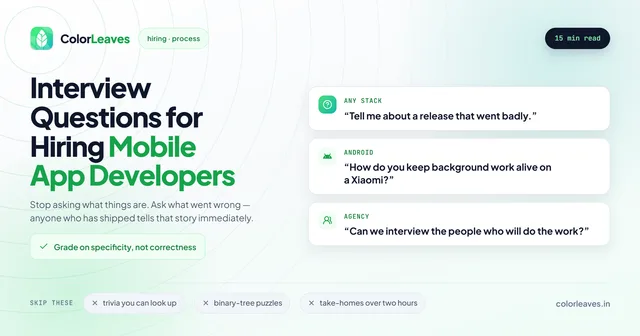
Two practical points. Whatever you pick, you need at least one person who can write and debug native code, because every cross-platform project eventually meets a requirement no package covers. And if you are staffing rather than buying a build, our cost to hire guide covers the rate bands by stack and seniority, while how to hire app developers in India covers the process and our interview questions cover the screening.
React Native vs Flutter: Which One Should You Pick?
If you’ve decided on cross-platform (and honestly, that’s the right call for most businesses), your next question is probably: React Native or Flutter?
Both are excellent. We build apps with both at our Pune office. Here’s how they compare:
Choose React Native if:
- Your development team already knows JavaScript or TypeScript
- You want to reuse code between your mobile app and a React web app
- You need a huge library of third-party packages (React Native’s npm ecosystem is massive)
- You’re building mostly standard UI: lists, forms, navigation, maps
Choose Flutter if:
- You want pixel-perfect custom UIs with lots of animations
- Performance is a big priority (Flutter compiles to native ARM code, so it’s slightly faster in most benchmarks)
- You’re starting fresh and don’t have an existing JavaScript team
- You might want to target web and desktop too down the road (Flutter supports all of them from one codebase)
A few honest observations from our experience:
- Flutter apps tend to look more polished out of the box because of its built-in widget system
- React Native has been around longer, so it has a bigger community and more third-party libraries
- Flutter’s hot reload is slightly faster, which makes development quicker
- Both are backed by tech giants (Google and Meta), so neither is going away anytime soon
For most projects, you genuinely can’t go wrong with either one. The deciding factor usually comes down to your team’s existing skills and the type of UI you want.
A Simple Decision Framework
Still not sure? Walk through these questions:
Question 1: What’s your budget?
- Under ₹5 lakhs → PWA or cross-platform MVP
- ₹5-15 lakhs → Cross-platform (React Native or Flutter)
- ₹15+ lakhs → Consider native if you have a strong reason, otherwise cross-platform still makes sense
Question 2: How fast do you need it?
- Under 3 months → Cross-platform or PWA
- 3-6 months → Any approach works
- No rush → Native gives you the most control
Question 3: Who are your users?
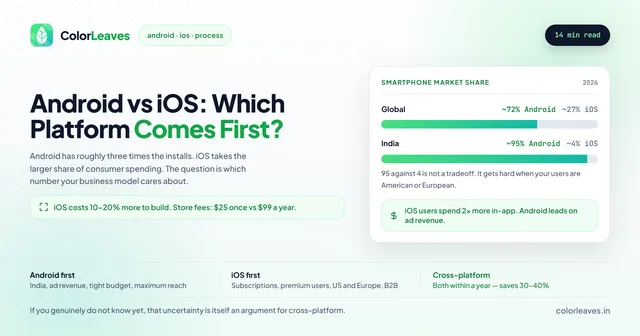
- Mostly India → Android first. Over 95% of Indian smartphone users are on Android (StatCounter). Start with Android if you can only pick one platform.
- Mostly US/Europe → You probably need both platforms, which makes cross-platform a smart choice.
- Premium/business users → iOS users tend to spend more on apps and in-app purchases.
Question 4: What does your app actually do?
- Standard business features (login, profiles, lists, payments, notifications) → Cross-platform handles this perfectly
- Heavy graphics, 3D, AR/VR → Go native
- Real-time features (chat, video calls, live tracking) → Both native and cross-platform work well here
- Simple content or information → PWA might be enough
Real-World Examples
Let’s make this concrete with some scenarios:
“I’m building an e-commerce app for my Pune-based retail business.” Go with cross-platform. E-commerce apps use standard UI patterns: product listings, search, cart, checkout, payment gateway. React Native or Flutter handle all of it well, and you’ll reach both Android and iOS users at roughly half the cost of native. Our ecommerce app development page covers the build, and the ecommerce cost guide covers the two things that decide profitability rather than budget, which are cash on delivery returns and the returns flow itself. Neither is affected by which framework you pick.
“I’m building a fitness app with real-time motion tracking.” Native is probably the better call here. Motion tracking relies heavily on device sensors and needs to be fast and accurate. A native Android app or iOS app will give you the best access to accelerometers, gyroscopes, and other hardware.
“I’m a startup and I just need to test if people will use my app idea.” Cross-platform MVP, no question. Build the core features with Flutter or React Native, launch it on both stores, and see what happens. You can always rebuild in native later if the idea takes off and you need better performance.
“I run a restaurant and want customers to see my menu and place orders.” A PWA might be enough here. It’s fast to build, cheap, and customers don’t need to download anything. They just visit your website. But if you want push notifications and a spot on the app stores, go cross-platform. If delivery and rider tracking are part of the plan, you are really building an on-demand product with three apps rather than one, and the on-demand cost guide covers what that changes.
“I’m building a healthcare app that connects patients with doctors.” Cross-platform works well here. Video calling, chat, appointment scheduling, prescription management: both React Native and Flutter support all of it. Just make sure your team knows how to handle data security and compliance, because in healthcare that shapes the architecture rather than sitting on top of it. Our healthcare development guide covers the consent and retention rules, and the same is true of anything financial. In both categories the framework is the least interesting decision you will make.
Our Honest Recommendation
After building 50+ apps as an app development company in Pune, here’s what we tell most of our clients:
For 80% of business apps, cross-platform is the right choice. The technology has matured to the point where the performance difference is barely noticeable for most use cases. You save money, you launch faster, and maintaining one codebase is much simpler than managing two.
Go native only if you have a specific, technical reason. If your app is a game, needs AR features, or does something really demanding with device hardware, then yes, native is worth the extra spend. But don’t pick native just because someone called it “better.” Better at what? For most apps, the answer is “not much.”
Skip the PWA unless your budget is very tight. PWAs have their place, but if you want a real app on the app stores with push notifications and a native feel, cross-platform gives you that at a reasonable price.
Conclusion
The “right” platform depends on your budget, your timeline, your target users, and what your app needs to do. There’s no universal answer. But for most businesses in Pune looking to build a mobile app, cross-platform development (React Native or Flutter) hits the best balance of cost, speed, and quality.
Not sure which route fits your project? Talk to our team. We’ll give you an honest assessment and a detailed quote. No pressure, no sales pitch, just straight advice based on 10+ years of building apps.
One last thing worth saying, since this decision gets more attention than it deserves. Whichever platform you pick, the app will succeed or fail on things that have nothing to do with it: whether the core job works every time on a cheap phone with a bad connection, whether you tested on real devices rather than emulators, and whether you ran a proper beta before launch. Teams agonise over React Native versus Flutter and then ship without doing any of that.
Related Guides
Dive deeper with these resources: Android vs iOS: which platform to build first, Flutter vs React Native comparison for cross-platform, and our complete beginner’s guide to building a mobile app. For budgeting, check our app development cost guide for India.