Most beta programmes produce almost nothing useful. A hundred people install the app, four send feedback, three of those say it looks nice, and the team launches having learned very little.
That is not a problem with beta testing. It is a problem with how the beta was run.
It’s also the cheapest quality step available to you, and the one most often cut when a build runs late. Every problem found here costs a fix. The same problem found after launch costs a fix, a store review cycle, and a public one star review that stays visible long after the bug is gone. Our step by step guide to building an app covers where this sits among everything else that has to happen before release.
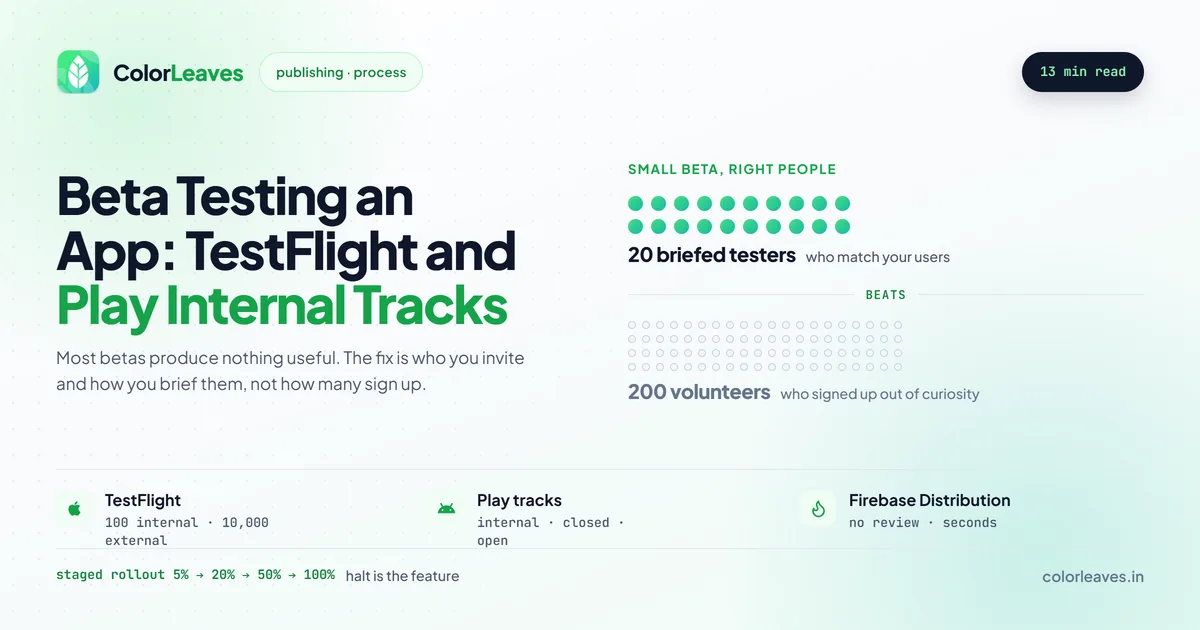
Key Takeaway: A small beta with the right people beats a large one with volunteers. Twenty engaged testers who match your actual audience will find more than two hundred who signed up out of curiosity, and the difference is almost entirely in how you brief them and how easy you make reporting.
TestFlight, and What It Actually Gives You
Apple’s TestFlight has two modes worth understanding separately.
Internal testing covers up to 100 members of your App Store Connect team. Builds go live almost immediately with no review, which makes this the right channel for your own team and anyone at the client end who needs to see progress.
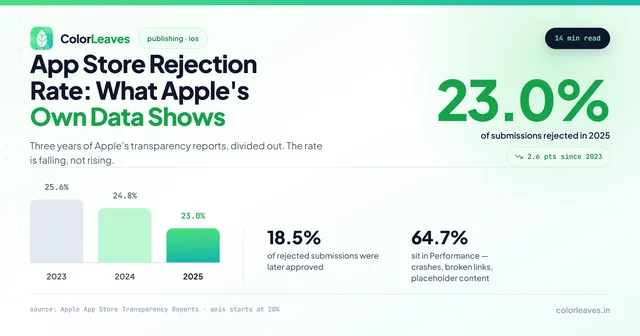
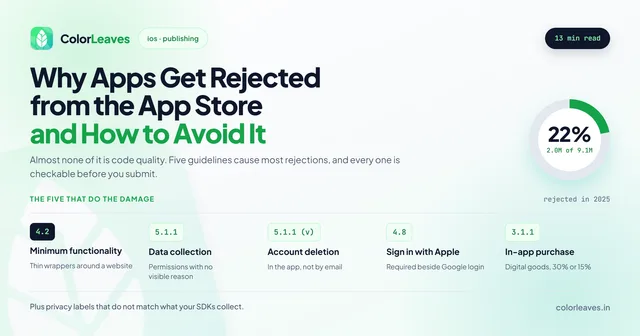
External testing covers up to 10,000 people invited by email or public link. Builds go through a lighter version of App Review before reaching testers, which usually takes a day. That review is not the full submission review, but it will catch obvious guideline problems, and finding those during beta rather than at launch is quietly one of the biggest benefits of running an external beta at all. Given that roughly a fifth of submissions get rejected, a free early warning is worth taking.
Builds expire after 90 days, which is worth planning around on long projects.
All of this needs an Apple Developer account in place first, and it should be yours rather than your vendor’s. The account setup guide covers the D-U-N-S requirement for organisations, which takes longer than teams expect and has stopped more than one beta before it started.
Google Play Testing Tracks
Play offers three tiers and the naming causes confusion.
Internal testing goes to up to 100 testers and updates within minutes. This is the equivalent of TestFlight internal and the right place for daily builds.
Closed testing goes to a list you control, by email or Google Group, with no hard cap. Review is light and quick.
Open testing is public. Anyone can join from your store listing, which is useful for volume and less useful for signal, because self-selected testers skew toward enthusiasts.
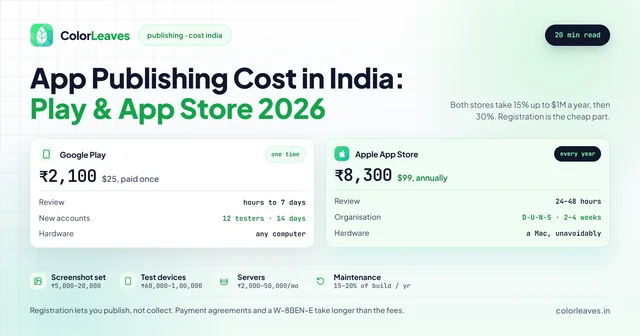
One thing that catches teams out: Google now requires a period of closed testing with a minimum number of testers before a new personal developer account can publish publicly. If you are on a personal rather than organisation account, check the current requirement early, because discovering it a week before launch is a bad day. Our Play Console setup guide covers the account side, and the publishing cost breakdown covers what both stores charge to get this far.
Firebase App Distribution, for Everything Before That
Store tracks are the wrong tool for the first few months of a build, and plenty of teams use them anyway because nobody mentioned the alternative.
Firebase App Distribution pushes builds to a tester list on both platforms with no review of any kind, in seconds rather than minutes. It’s free. Testers get an email, install, and you can push twenty builds a day without anybody’s approval.
Use it during development, when your audience is the client and your own QA, and switch to store tracks once you’re preparing an actual release. It also solves the cross-platform problem of two separate distribution channels, since one dashboard covers both iOS and Android builds.
The tradeoff is that it tests nothing about the store pipeline. Provisioning, entitlements, signing and the review process are all skipped, and those break too. Get into TestFlight and Play internal at least a few weeks before submission so the release machinery is exercised while there’s still time.
Choosing Testers Who Will Actually Help
The instinct is to recruit as many people as possible. It is the wrong instinct.
Pick people who resemble your real users rather than people who are available. If you are building for warehouse supervisors, five warehouse supervisors beat fifty colleagues. Colleagues are unusually forgiving, unusually technical, and will not use the app the way a stranger does. This gets harder the further your users sit from your office, which is why factory floor tools and field service apps need testers recruited from the actual site rather than from the client’s head office.
Cover your device matrix deliberately. If your analytics say a meaningful share of users are on older Android hardware, you need testers on older Android hardware. Recruiting testers who all carry current flagships tells you the app works on current flagships. Our piece on Android device fragmentation covers how to choose that matrix, and it applies to picking testers just as much as to buying handsets.
Keep the group small enough to talk to individually. Twenty people you can message directly produce more than two hundred you cannot.
Where do you find them? Existing customers first, if you have any. Then the client’s own staff who do the job the app is for, which is different from the client’s managers. Then a small paid panel if the audience is genuinely hard to reach. Paying twenty people a modest amount for two weeks of real attention is cheaper than most of the alternatives and produces markedly better reports.
Briefing People So You Get Signal
Handing someone a build and asking them to try it out produces “looks good, nice work.”
Give them tasks instead. Sign up and add your first project. Try to change your password. Use it on your commute where the signal drops, which for anything like a transit or travel app is the only condition that matters. Specific instructions produce specific findings, and the tasks that fail are exactly what you needed to know.
Ask what confused them rather than what they liked. Politeness makes people report positives and suppress friction, and friction is the entire point.
Include the boring flows. Password reset, changing an email address, cancelling something, deleting an account. These get less design attention than the main path and more support tickets after launch, and they’re the flows a UX review usually flags first.
Make reporting take ten seconds. TestFlight lets testers screenshot and annotate from inside the app. Play has similar in-app feedback. If your process requires opening a form in a browser, most of the feedback you would have received simply will not arrive.
Watching the Numbers as Well as the Comments
Written feedback is one channel and the weaker one. Instrumentation tells you what people did rather than what they remember doing.
Crash-free rate is the headline. Anything below 99 percent going into launch is worth stopping for, and you want it measured across your device matrix rather than in aggregate, because a single problem device can hide behind a good average.
Watch where people drop out of onboarding. That funnel is where most products lose users, and beta is when it is cheap to fix. The same logic applies to whatever your app’s money step is. On an ecommerce build that’s checkout, and one confusing step there costs more than any feature you could add in its place.
Watch session length and return rate honestly. Testers who install once and never open it again have told you something, even though they never wrote a word.
Get the instrumentation in before the beta rather than after it. Crash reporting, a basic analytics funnel and a way to identify which build a report came from. Retrofitting this mid-beta means the first week of data is not comparable to the second, and you’ll end up guessing about the exact period you most wanted to measure.
Triaging What Comes Back
Feedback arrives unsorted and mostly as opinion. Somebody has to turn it into decisions, and if nobody owns that job the reports pile up unread and testers stop sending them.
Sort everything into four buckets on the way in. Bugs, which are objective and get fixed. Confusion, where the app works but the tester could not tell, which is usually a design fix rather than a code one. Requests, which mostly get logged and not built. And environment problems, which are the tester’s network or an unusual device state rather than your app.
The confusion bucket is the valuable one and the easiest to dismiss. When three separate people miss the same button, that is not three people being careless.
Say no to most requests, and say it out loud. Testers who see their suggestion silently ignored stop suggesting. Testers who get told “not for this release, here’s why” keep going. It costs a sentence.
Agree upfront who does this work and whether it’s billable. If an outside team built the app, fixing beta findings should be part of the engagement rather than a change request, which is the kind of thing the contract checklist exists to settle before it becomes an argument.
How Long a Beta Should Run
Two to four weeks suits most products. Shorter and testers have not hit the edge cases. Longer and enthusiasm decays, people stop reporting, and you are shipping builds to an audience that stopped paying attention.
Plan at least one full cycle where you fix reported issues and push an updated build. A beta that only collects and never responds trains people not to bother, and you will feel that on the next release.
Where This Sits in the Schedule
Beta belongs after feature completion and before submission, and it needs genuine calendar space rather than the gap between finishing and launching.
Teams that compress it because development ran late get the worst of both: the delay of running a beta and none of the benefit, because there was no time to act on anything. If the schedule is tight, a shorter beta with fewer, better testers is a far better trade than a longer one nobody has time to respond to.
Our app development timeline puts this against the rest of a build, and the full development process covers which phase it belongs to. On a first version you can run it shorter, but running it at all is what separates a small launch from a bad one.
Beta Does Not Stop at Launch
The most useful safety net is the one immediately after release, and plenty of teams skip it.
Both stores support staged rollout. On Play you release to a percentage of users and raise it: 5 percent, then 20, then 50, then everyone, watching crash rate at each step. Apple’s phased release does the same across seven days. Both let you halt.
This matters because beta testers are a self-selected group of a few dozen and launch day is everyone. Problems that need scale to appear, server load, an edge case in a locale nobody tested, a payment path that fails for one bank, show up at 5 percent where you can stop, rather than at 100 percent where you cannot.
Halt is the feature. If crash rate moves in the wrong direction, pause the rollout, fix, and resume. Users already updated keep the broken build until you ship over it, so pausing early genuinely limits the blast radius.
Keep watching for a fortnight afterwards. The maintenance work that follows a launch is not optional, and having an ongoing support arrangement in place before launch day is considerably cheaper than arranging one during an incident.
Frequently Asked Questions
How many beta testers do we need?
Twenty engaged testers matching your real audience is plenty for most products. The number matters far less than whether they resemble your users and whether you brief them properly.
Can we run TestFlight and Play testing at the same time?
Yes, and you should if you are launching both platforms. Just track feedback in one place, because platform-specific issues are easy to lose when reports arrive through two separate channels.
Do beta testers need to be under NDA?
For a public consumer product, usually not. For anything competitively sensitive or pre-announcement, yes, and TestFlight external links are public enough that you should assume anyone with the link can join. Regulated products are stricter again. A healthcare app handling real patient data during beta needs proper agreements and usually synthetic data rather than live records, and the same caution applies to anything financial.
Does TestFlight review count as App Store review?
No. It is a lighter check that catches obvious guideline problems. Clearing TestFlight review is not a guarantee of clearing submission, though it does surface some issues early. Our guide on why apps get rejected covers what full review actually checks.
What if the beta reveals a fundamental problem?
Then it did its job, and finding it now is dramatically cheaper than finding it after launch with real users and public reviews. This is the case for building genuine beta time into the plan rather than treating it as a formality.
Who should hold the developer accounts during beta?
You should, always. If the beta runs under a vendor’s account, so does the launch, and so does every update after it. Who owns your code covers why this is worth settling at the start rather than at handover.
Should we beta test on both platforms if we only have budget for one?
Test the platform with more users, and if that’s genuinely unknown, test Android. The device and OS spread is wider, so a beta finds more per tester. Our comparison of which platform to launch first covers how to decide the larger question.
Before You Ship
Beta is where the difference between an app that was built and an app that was tested becomes visible. A team that runs one properly will tell you about it unprompted, which makes it a useful thing to ask about when choosing who builds your app.
If you want the platform-specific detail, our iOS app development and Android app development pages cover how release management works on each side, including who holds the developer accounts and who handles review correspondence. StockGenie went through exactly this process on the way to a 4.5 rating, and the hiring guide covers what to agree with any team before the first build goes out.
If a launch is coming up and the beta plan is still vague, talk it through with us.