Before a single iPhone user can download your app, you have to pay Apple. The Apple Developer Program is the gate, and unlike Google Play, it isn’t a one-time thing. It’s a yearly bill, and a lot of first-time publishers in India only find out the renewal part after their apps quietly disappear from the App Store. If you’re planning an iOS launch in 2026, it’s worth knowing exactly what you’re signing up for, what it covers, and how to pay for it from India without the usual card headaches.
This guide breaks down the Apple Developer account cost in India, the difference between individual and organization enrollment, the free D-U-N-S number you’ll need as a business, and what the annual renewal actually means for your apps.
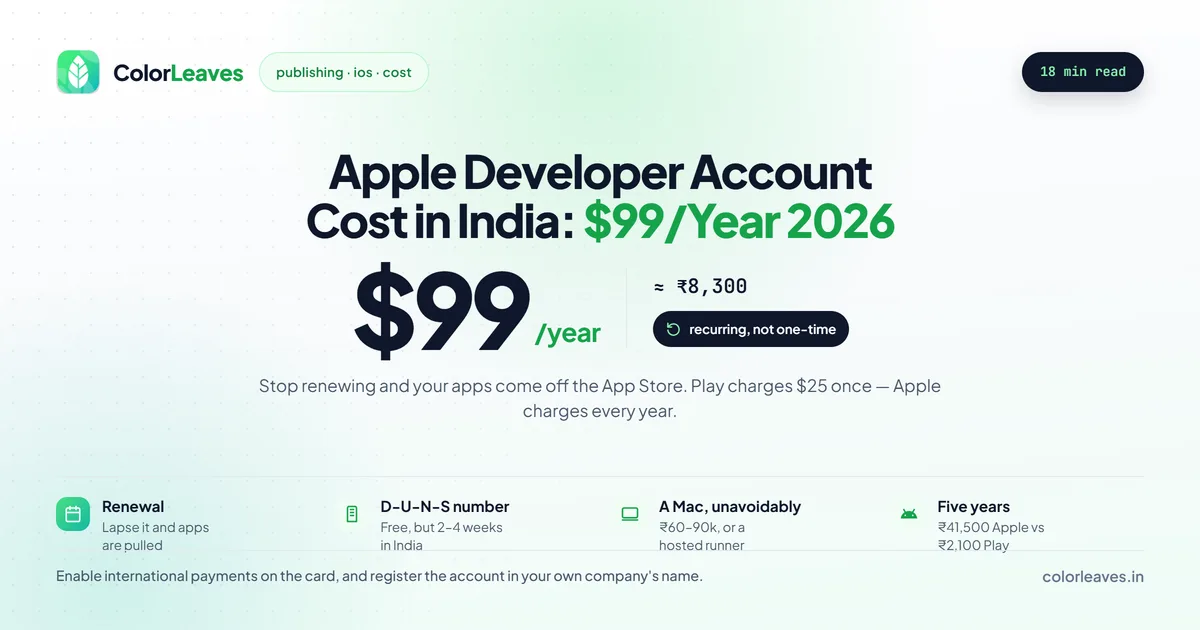
Key Takeaway: An Apple Developer account costs $99 per year (about ₹8,300, roughly ₹8,000 to ₹8,700 depending on the exchange rate) in India. It’s an annual fee, not a one-time payment. Stop renewing and your apps get pulled from the App Store. Organizations also need a free D-U-N-S number, which takes 2 to 4 weeks to get in India.
How Much an Apple Developer Account Costs in India
The Apple Developer Program costs $99 per year (Apple). At current exchange rates that lands around ₹8,300, and you’ll see it billed anywhere from ₹8,000 to ₹8,700 depending on the dollar rate and your card’s forex markup on the day.
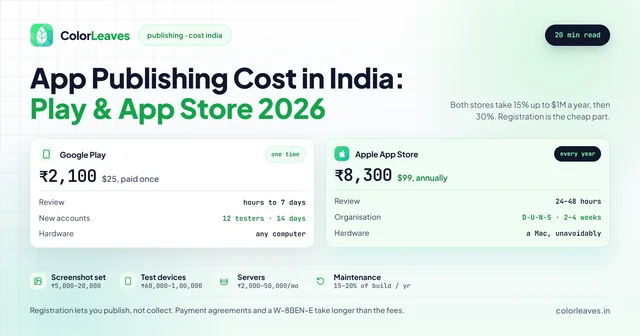
The number that matters most here is “per year.” This is a recurring membership. You pay it the day you enroll, and you pay it again twelve months later, every year, for as long as you want your apps on the App Store. That’s the single biggest difference from Google Play, which charges $25 once and never again.
| Item | Cost | Notes |
|---|---|---|
| Apple Developer Program membership | $99/year (~₹8,300) | Recurring, billed in USD |
| D-U-N-S number (organizations) | Free | Takes 2 to 4 weeks in India |
| Mac for building | One-time hardware cost | Xcode runs only on macOS |
| Renewal (every year) | $99/year (~₹8,300) | Miss it and apps come down |
The membership fee is the only mandatory charge Apple collects to keep you in the program. Everything else (screenshots, a privacy policy page, ASO tools) is the same polish you’d budget for any launch, and we covered all of that in our full app publishing cost guide.
Paying From India
The fee is billed in USD, so you pay with an internationally enabled credit or debit card. Apple accepts Visa, Mastercard, and Amex issued by Indian banks, as long as the card has overseas transactions switched on. This is the same snag people hit with Google Play. Plenty of Indian cards have international use disabled by default, and the payment just fails with no clear reason. Most banks let you toggle it on through their app in under a minute, so check that before you start.
You’ll also pay a small forex conversion fee and GST on top, which is why the rupee figure on your statement nudges a bit above the clean ₹8,300 mark.
Individual vs Organization Enrollment
When you enroll, Apple gives you two paths: join as an individual or as an organization. The fee is identical either way. What changes is the paperwork, the processing time, and the name your apps get published under.
| Feature | Individual | Organization |
|---|---|---|
| Annual Fee | $99/year | $99/year |
| Published under | Your personal name | Company name |
| D-U-N-S Number | Not required | Required |
| Documents needed | Apple ID + Government ID | D-U-N-S + legal entity proof |
| Team management | Single developer | Multiple members with roles |
| Processing time | 24 to 48 hours | 1 to 4 weeks |
| Best for | Solo devs, freelancers | Companies, startups, agencies |
If you’re a freelancer or testing a side project, the individual account is the fast lane. You verify with an Apple ID and a government photo ID, and you’re usually approved within a day or two.
Running a registered business? Go with the organization account. Your apps publish under the company name instead of your personal one, which reads as more trustworthy to users, and you can add team members with different permission levels (developer, marketing, admin) instead of sharing one login. The trade-off is the D-U-N-S number and a longer wait.
The Free D-U-N-S Number (Organizations Only)
A D-U-N-S number is a unique nine-digit business identifier issued by Dun & Bradstreet. Apple uses it to confirm your company is a real, registered legal entity before letting you enroll as an organization.
Two things to know. First, it’s free. Anyone trying to sell you one is reselling something you can request yourself at no cost. Second, it takes time. In India, getting a fresh D-U-N-S number runs 2 to 4 weeks, and sometimes longer if Dun & Bradstreet needs to verify your business details.
Check whether your company already has one using Apple’s D-U-N-S lookup tool. Older or larger businesses often already have a number on file, which skips the wait entirely. If you don’t have one, request it the moment you decide to publish on iOS. We’ve seen clients lose two to three weeks of their launch window simply because nobody knew the D-U-N-S number had to come before enrollment could even start.
Treat it as a task in week one of the project rather than a step before submission. On a build running to a normal timeline of three to five months, four weeks of paperwork is easily absorbed if it starts on day one and is a genuine delay if it starts in month four. It belongs on the plan alongside everything else in the development process, not in somebody’s head.
The Mac You Cannot Avoid
The table above lists a Mac as a cost and moves on, which undersells the problem for teams new to iOS.
Xcode runs only on macOS, and Xcode is what compiles, signs and uploads an iOS build. There is no supported way around this. Cross-platform frameworks do not change it either: Flutter and React Native let you write the code anywhere, and the iOS build still has to happen on a Mac.
Three practical routes. A Mac mini is the cheapest real machine and is entirely adequate for building and archiving, at roughly ₹60,000 to ₹90,000 depending on configuration. A MacBook costs more and matters if the person building also travels. Or you rent one, through a cloud Mac provider or a hosted CI service, which suits a team that needs a build machine occasionally rather than daily.
The route most teams land on eventually is cloud CI. Push to a branch, a hosted macOS runner builds and signs the app, and the result lands in TestFlight without anybody’s laptop being involved. Setting that up costs a day or two and removes the single most common iOS bottleneck, which is the build only working on one particular person’s machine. If you are working with an outside team, ask how they build. The answer tells you whether the pipeline is a process or a person.
What Your $99 Membership Includes
The fee isn’t just a tax to get onto the store. The membership comes with the actual tools and access you need to build, test, and ship iOS apps:
- App Store distribution. The right to publish apps on the App Store across all of Apple’s platforms (iPhone, iPad, Mac, Apple Watch, Apple TV, and Vision Pro).
- App Store Connect. The dashboard where you manage listings, pricing, in-app purchases, app analytics, and the review submission process.
- TestFlight. Apple’s beta testing service. You can invite up to 10,000 external testers to try your build before it goes live, which is far smoother than Google Play’s closed-testing setup.
- Code signing certificates. The signing identities and provisioning profiles required to install your app on real devices and submit to the store.
- Beta OS access. Early developer builds of iOS, iPadOS, and the rest, so you can test against the next version before your users get it.
- Advanced app capabilities. Push notifications, Sign in with Apple, in-app purchases, CloudKit, and other entitlements that only paid members can enable.
For most teams the practical value is App Store Connect plus TestFlight plus the signing setup. Those three are what turn finished code into a live, downloadable app.
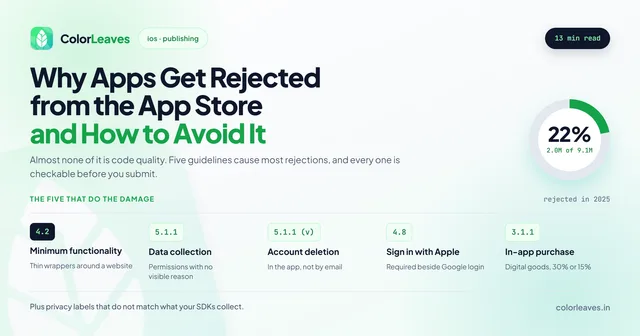
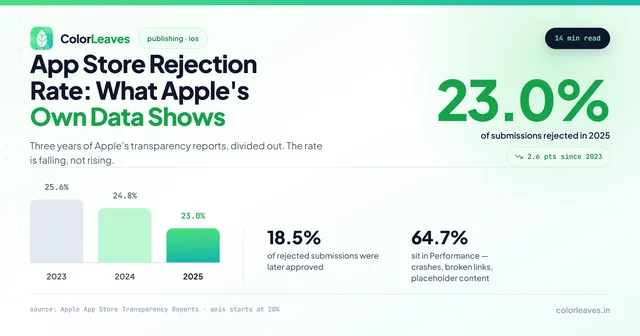
TestFlight is worth more than its billing suggests. External builds go through a lighter version of App Review before reaching testers, so an obvious guideline problem surfaces days before it can cost you a submission cycle. Given that roughly one in four submissions is rejected, a free early warning matters. Our guide to beta testing on TestFlight and Play internal tracks covers running one that produces useful feedback rather than a handful of “looks good” messages.
Setting Up to Actually Get Paid
Skipped by nearly every guide to this, and it stops more launches than the enrollment does.
Enrolling lets you publish. It does not let you collect money. Before you can sell a paid app, a subscription or anything through in-app purchase, you complete a separate set of agreements and forms inside App Store Connect: the Paid Applications agreement, tax forms, and bank details.
For an Indian entity that means a W-8BEN-E to establish foreign status, so Apple does not withhold US tax on your earnings, plus your bank account details and GST information. None of it is hard. All of it takes longer than expected when somebody discovers it the week of launch, particularly if the finance person who has to sign is on holiday.
Two related points. Apple pays roughly a month in arrears once you pass a minimum threshold, so your first revenue arrives later than your first sale. And you only need any of this if you are actually charging inside the app. If you sell physical goods or real-world services, those go through a normal payment gateway and Apple takes nothing, though implementing in-app purchase there anyway is itself a rejection.
Who Holds the Account, and Moving an App Later
The account is an asset. Treat it like one.
Apple’s roles matter more than they look. The Account Holder is the only person who can accept agreements and manage the membership, and there is exactly one. Admins can manage users and apps. Developers can upload builds. Give people the least role that lets them work, and make sure the Account Holder is somebody who will still be at your company next year.
If an agency publishes your app under their account, the listing, the review history, the install base and the right to ship an update belong to them. Moving an app to a different Apple account is possible, but it requires the current holder to initiate it and cooperate, and if you are switching vendors because the relationship soured, cooperation is precisely what you have lost. Our piece on who owns your code covers this alongside the repository and the cloud accounts, and the contract checklist covers the clause that prevents it.
Register the account in your company’s name before development starts. It costs the same $99 either way, and it is a ten minute job at the beginning and a genuine problem later. Ask this of every vendor you evaluate, including us. Some categories make it non-negotiable: Apple expects financial apps to be submitted by the institution itself rather than by a contractor, and healthcare products face similar scrutiny.
Annual Renewal: What Happens If You Stop Paying
This is the part that catches people, so it’s worth being blunt about it. The Apple Developer Program is a subscription. When your year is up, Apple charges the $99 again. If the payment doesn’t go through (an expired card, a forex block, or you simply forgot), your membership lapses.
When the membership lapses, your apps are removed from the App Store. They stop showing up in search, the download page goes dead, and new users can’t get them. People who already installed your app keep it on their phones for now, but you can’t push updates, fix bugs, or respond to a rejected build until you renew.
Apple lets you renew up to 30 days before expiry, and it’ll send reminder emails as the date approaches. The safe move is to set your renewal card to one with international transactions permanently enabled, and to treat the $99 as a fixed annual cost of keeping your app alive, the same way you’d budget hosting or app maintenance. Compare that to Google Play, where the $25 is genuinely a pay-once-and-forget deal.
Those reminders go to whichever email holds the Account Holder role, which is worth checking now rather than in eleven months. If that address belongs to a developer who has since left, or to an agency you no longer work with, nobody sees the warning and the first sign of trouble is your app vanishing from search. Put a shared company address on the account and a calendar reminder alongside it. Whoever handles your ongoing support should be tracking the renewal date as part of the arrangement.
Apple vs Google Play: Cost Comparison
If you’re shipping to both stores, here’s how the two developer accounts stack up on cost and structure.
| Factor | Apple App Store | Google Play Store |
|---|---|---|
| Account Fee | $99/year (~₹8,300) | $25 one-time (~₹2,100) |
| Recurring? | Yes, every year | No, pay once |
| Five-year cost | $25 (~₹2,100) | |
| D-U-N-S required | For organizations | For organizations |
| Org processing time | 1 to 4 weeks | 5 to 10 business days |
| Individual approval | 24 to 48 hours | 2 to 5 days |
| Revenue share (first $1M/year) | 15% | 15% |
| Revenue share (above $1M/year) | 30% | 30% |
| Hardware needed | Mac required | Any computer |
Over five years the gap is real: roughly ₹41,500 for Apple against a single ₹2,100 for Google. That’s not a reason to skip iOS, though. iPhone users in India spend more per head on apps and in-app purchases, so the audience often justifies the recurring fee. It’s just a cost you plan for, not one you discover later. For the full side-by-side on submission steps and review timelines, see our app publishing cost guide.
The account fee should not drive the platform decision anyway. ₹8,300 a year is noise next to the build cost, and which platform to launch first turns on where your users are and what they spend rather than on registration fees. The review processes differ more than the prices do: Apple’s is largely human and rejects roughly a quarter of submissions, while Google’s is mostly automated and usually clears within hours. Our breakdown of why apps get rejected covers what Apple’s reviewers actually check, and it is worth reading before your first submission rather than after it.
If you are shipping to both, cross-platform development covers both stores from one codebase, and the hybrid development overview covers what that team looks like.
Frequently Asked Questions
How much does an Apple Developer account cost in India?
An Apple Developer account costs $99 per year (Apple), which works out to about ₹8,300 in India, give or take depending on the exchange rate and your card’s forex fee. It’s an annual membership, not a one-time payment, and the same fee applies to both individual and organization accounts.
Is the Apple Developer fee one-time or yearly?
It’s yearly. You pay $99 when you enroll and again every twelve months to stay in the program. This is different from the Google Play developer account, which charges $25 just once. If you let the Apple membership lapse, your apps are removed from the App Store until you renew.
Do I need a D-U-N-S number for an Apple Developer account?
Only if you enroll as an organization. Individual accounts don’t need one. The D-U-N-S number is a free nine-digit business identifier from Dun & Bradstreet, and getting it in India takes 2 to 4 weeks. Check Apple’s D-U-N-S lookup tool first, since your company may already have one.
Can I pay the Apple Developer fee with an Indian card?
Yes. Apple bills the $99 in USD, and you can pay with a Visa, Mastercard, or Amex issued by an Indian bank, as long as international transactions are enabled on the card. Many Indian cards block overseas payments by default, so switch that on in your banking app before you enroll.
Do we need a Mac to publish an iOS app?
Yes. Xcode runs only on macOS and it is what compiles, signs and uploads the build. Cross-platform frameworks do not get you out of this, since Flutter and React Native let you write the code anywhere while the iOS build still happens on a Mac. A Mac mini at ₹60,000 to ₹90,000 is the cheapest real option, and a hosted CI runner is the better answer for a team that builds occasionally.
What happens if I don’t renew my Apple Developer membership?
Your apps get taken down from the App Store. New users won’t be able to find or download them, and you can’t publish updates or fixes. People who already installed the app keep it, but you regain full control only after you renew and the membership reactivates.
Is the Apple Developer Program more expensive than Google Play?
Over time, yes. Apple charges $99 every year while Google Play charges $25 once. Across five years that’s roughly ₹41,500 for Apple versus ₹2,100 for Google. Both stores take the same revenue cut on paid apps and in-app purchases: 15% on the first $1 million a year, then 30% above that.
What is the Apple Developer Program annual fee in India?
The Apple Developer Program annual fee is $99 per year, which comes to about ₹8,300 in India depending on the exchange rate and your card’s forex charge. The same fee applies whether you enroll as an individual or an organization.
What is the App Store listing fee?
There’s no per-listing fee on the App Store. Apple doesn’t charge you for each app you publish. The only cost is the $99 per year Apple Developer Program membership, which covers every app on your account.
Can our development agency enroll on our behalf?
They can help you through the process, and the account should still be registered to your company with you as Account Holder. An app published under an agency’s account leaves the listing, the ratings history and the right to ship updates with them. Ask this of any firm you are considering, which our guide to hiring app developers in India covers alongside the other terms worth settling before work starts.
Is $99 a year worth it for a small app?
If you have paying users on iPhone, easily. If you are validating an idea and your audience is mostly Android, launching on Play first and adding iOS once the concept holds up is a reasonable sequence, and our MVP costing guide covers scoping that first version. The fee is small next to the build; the reason to delay iOS is focus rather than ₹8,300.
Planning an iOS Launch?
Setting up an Apple Developer account sounds like a five-minute job until the D-U-N-S number takes a month, the card won’t process the fee, or your first build bounces back from Apple’s review. The account is only the start. Getting an app through App Store review cleanly is a separate skill.
At Color Leaves, we handle the whole thing as part of our iOS app development services from Pune. We’ve shipped 50+ apps to the App Store, and we sort out enrollment, the D-U-N-S paperwork, code signing, TestFlight builds, and the review back-and-forth so you don’t lose weeks learning it the hard way. Got an iOS app ready, or one still on the drawing board? Talk to our team and we’ll get it live the right way.
If you are choosing who does this rather than doing it yourself, our guide to choosing a development company covers what to ask, and what it costs to hire developers in India covers the rate bands if you would rather staff a team.
After the Account Is Set Up
Enrollment is the easy part. What follows is certificates, provisioning profiles, TestFlight groups and the App Store Connect setup that catches out most first-time publishers.
One thing worth settling early: whose account your app lives under. If an agency publishes under theirs, your ratings history and the right to ship an update sit with them permanently. We publish under yours. The rest of how we work with clients abroad is on our iOS app development in India page, or see hiring iOS developers if you would rather add a Swift engineer to your own team.