You spent months planning, designing, and building your app. It’s live on the Play Store and App Store. Users are downloading it. Things are going well, until they’re not.
One morning, Android pushes a new OS version and your app’s navigation breaks on Samsung devices. A week later, a user reports that the payment flow crashes on iOS 19. Then your cloud hosting bill spikes because nobody optimized the database queries after launch.
This is the reality most businesses don’t prepare for. They budget carefully for development but treat maintenance as an afterthought. We’ve seen it happen dozens of times at our Pune office. A client launches a great app, stops investing in it, and within 6-12 months the thing is riddled with issues that cost more to fix than ongoing maintenance ever would have.
If you’ve already gone through the app development cost in India planning, this guide picks up where that one leaves off. Here’s what happens after launch, and what it actually costs.
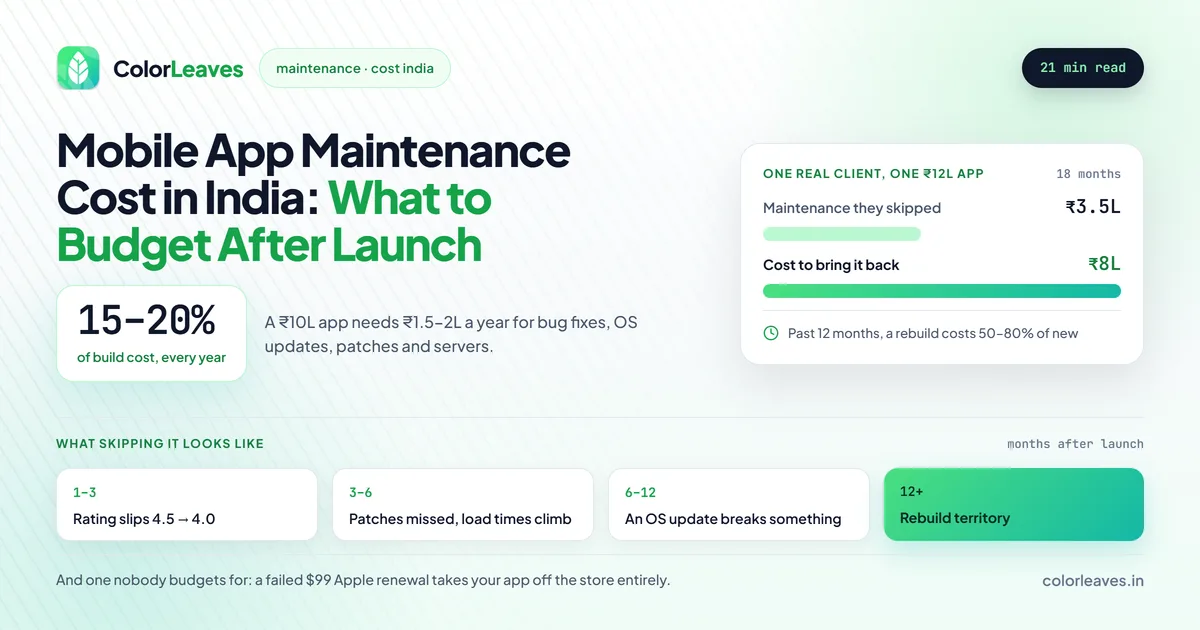
Key Takeaway: Budget 15 to 20% of your initial development cost every year for app maintenance. If your app cost ₹10 Lakhs to build, expect to spend ₹1.5 to 2 Lakhs per year on bug fixes, OS updates, security patches, and feature improvements.
Why App Maintenance Isn’t Optional
Here’s a number that surprises most of our clients: the average mobile app loses 77% of its daily active users within the first three days after install. The apps that retain users? They’re the ones that keep getting better. They fix bugs fast, ship new features, and stay compatible with the latest devices and OS versions.
Maintenance isn’t just about keeping the lights on. It directly affects:
- App store rankings. Google and Apple both factor in update frequency, crash rates, and user ratings. An app that hasn’t been updated in 6 months gets penalized in search results.
- User retention. Users expect apps to improve. If your competitors are shipping updates and you’re not, users will switch.
- Security. New vulnerabilities turn up constantly. An unpatched app is an invitation for data breaches, and with India’s data-protection rules tightening, that can mean legal trouble too.
- Revenue. Bugs in payment flows, broken features, and slow performance all translate directly to lost revenue.
The industry standard is to budget 15-20% of your initial development cost annually for maintenance. If your app cost ₹10 Lakhs to build, expect to spend ₹1.5-2 Lakhs per year keeping it healthy. That’s cheap next to the alternative, which is a full rebuild because you let things rot for two years.
Types of App Maintenance
Not all maintenance is the same. Understanding the categories helps you plan your budget and prioritize what matters most.
1. Corrective Maintenance (Bug Fixes)
This is the reactive stuff: fixing bugs that users report or that show up in crash analytics. Every app has bugs. The question is how quickly you find and fix them.
Common examples:
- App crashes on specific devices or OS versions
- UI elements overlapping on certain screen sizes
- API failures causing blank screens or incorrect data
- Memory leaks that slow the app down over time
Typical cost: ₹10,000-50,000 per month depending on app complexity and bug volume.
2. Adaptive Maintenance (OS and Device Updates)
Google and Apple release major OS updates every year. Android 16, iOS 19, each one can introduce breaking changes. Your app needs testing against new OS versions and an update if anything breaks.
There is a harder deadline underneath that one. Google raises the target API level requirement every year, and apps that miss it stop being discoverable to new users on current devices. That makes at least one compliance release a year mandatory before a single feature is added, whether or not it suits your roadmap. Any development proposal that ends at launch has quietly made that your problem.
Beyond OS updates, new devices come out constantly. Foldable phones, tablets, new screen sizes: your app needs to work on all of them. This is where a maintained device matrix earns its cost, and our piece on Android device fragmentation covers choosing five or six devices that do most of the work. Updates get rejected too, sometimes against rules that did not exist when the app first shipped, which is how account deletion caught a lot of live apps. Our guide to why apps get rejected covers what reviewers check, and it applies to version 12 as much as version 1.
Typical cost: ₹50,000-2 Lakhs per major OS update cycle (usually once a year per platform).
3. Perfective Maintenance (Feature Updates and Improvements)
This is where you add new features, improve existing ones, and optimize performance based on user feedback and analytics. It’s what keeps your app competitive.
Examples:
- Adding a new payment method (like UPI Lite or a new wallet)
- Redesigning the onboarding flow to improve conversion
- Adding dark mode support
- Performance optimizations to reduce load times
Typical cost: ₹50,000-3 Lakhs per quarter, depending on scope.
This is the category that quietly turns into new development if nobody watches it. A redesigned onboarding flow is a design project, not a maintenance ticket, and treating it as one is how a retainer gets consumed by a single feature while the bug queue grows. Batch genuine feature work into a planned release and price it separately, the same way you would have priced the original MVP.
4. Preventive Maintenance (Security and Infrastructure)
This is the stuff users never see but absolutely depend on: security patches, server updates, SSL certificate renewals, database optimization, dependency updates, and code refactoring.
Skipping preventive maintenance is like skipping oil changes on your car. Everything seems fine until the engine seizes.
Typical cost: ₹20,000-80,000 per month.
5. Server and Infrastructure Costs
Your app’s backend needs servers, databases, file storage, CDN, and various third-party services. These are recurring costs that scale with your user base.
| Infrastructure Component | Monthly Cost Range | Notes |
|---|---|---|
| Cloud hosting (AWS/GCP) | ₹3,000-50,000 | Scales with traffic and data |
| Database hosting | ₹2,000-20,000 | Depends on data volume |
| CDN (content delivery) | ₹1,000-10,000 | For images, videos, static assets |
| Push notification service | ₹1,000-5,000 | Firebase is free up to a limit |
| Analytics tools | ₹0-10,000 | Firebase Analytics is free; Mixpanel/Amplitude cost more |
| SSL certificates | ₹0-5,000 | Free with Let’s Encrypt, paid for EV certs |
| Email/SMS services | ₹1,000-10,000 | For OTPs, transactional emails |
| Error monitoring (Sentry, Crashlytics) | ₹0-5,000 | Free tiers available |
Total infrastructure: ₹8,000-1,00,000+ per month depending on your app’s scale and user base.
Annual Maintenance Cost Breakdown by App Complexity
Here’s the table most of our clients find most useful. This covers everything: bug fixes, OS updates, security patches, minor feature improvements, and server costs.
| Category | Simple App | Medium App | Complex App |
|---|---|---|---|
| Initial development cost | ₹2-5 Lakhs | ₹5-15 Lakhs | ₹15-40+ Lakhs |
| Bug fixes & monitoring | ₹30,000-60,000/yr | ₹60,000-1.5 Lakhs/yr | ₹1.5-3 Lakhs/yr |
| OS & device compatibility | ₹20,000-50,000/yr | ₹50,000-1.5 Lakhs/yr | ₹1-2.5 Lakhs/yr |
| Security patches & updates | ₹15,000-40,000/yr | ₹40,000-1 Lakh/yr | ₹1-2 Lakhs/yr |
| Server & infrastructure | ₹1-2 Lakhs/yr | ₹2-6 Lakhs/yr | ₹6-15 Lakhs/yr |
| Minor feature updates | ₹50,000-1 Lakh/yr | ₹1-3 Lakhs/yr | ₹3-8 Lakhs/yr |
| App store management | ₹10,000-20,000/yr | ₹10,000-20,000/yr | ₹20,000-40,000/yr |
| Total annual maintenance | ₹2-4.5 Lakhs/yr | ₹4.5-13 Lakhs/yr | ₹12-30+ Lakhs/yr |
| As % of dev cost | ~15-20% | ~15-20% | ~15-20% |
These numbers are based on what we’ve seen across 50+ apps we’ve built and maintained over the past decade. Your actual costs will depend on your specific app, user base, and how aggressively you want to improve the product.
For a detailed understanding of initial development costs, refer to our app development cost in India guide.
What Happens When You Skip Maintenance
We’re not going to sugarcoat this. We’ve taken over projects from businesses that neglected maintenance for a year or more, and the cost of recovery is almost always higher than what ongoing maintenance would have been.
Here’s what typically goes wrong:
Months 1-3 without maintenance:
- Minor bugs accumulate. Users start leaving 1-2 star reviews. App store rating drops from 4.5 to 4.0.
- New OS beta versions aren’t tested. You’re flying blind.
Months 3-6 without maintenance:
- Security vulnerabilities go unpatched. Third-party libraries you depend on release critical updates that you miss.
- Server performance degrades as database grows without optimization. Load times increase.
- Users notice the app feels “outdated” compared to competitors.
Months 6-12 without maintenance:
- Major OS update breaks something visible. Crash rates spike. App store rating drops below 4.0.
- A dependency reaches end-of-life. You’re now running code with known security holes.
- User complaints flood in. Your support team is overwhelmed.
12+ months without maintenance:
- The app may need a partial or complete rebuild. Migration costs are 50-80% of building from scratch.
- You’ve lost users who won’t come back. Rebuilding trust is harder than building it.
The compounding is what makes this expensive rather than any single item. A rebuild at that point costs most of what the original did, and our app development cost guide will tell you what that number looks like today rather than what you paid three years ago. Rebuilds also run longer than originals, because somebody has to understand the existing code before replacing it, which our development timeline guide accounts for.
One client came to us after 18 months of zero maintenance on a ₹12 Lakh app. The cost to bring it back to a healthy state? ₹8 Lakhs. They would have spent roughly ₹3.5 Lakhs on maintenance over that same period. The math speaks for itself.
The Failure Mode Nobody Budgets For
Everything above assumes the app is still on the stores. There is a way to lose it that has nothing to do with code.
The Apple Developer Program is a $99 annual subscription, and if the renewal fails your apps are removed from the App Store. Not flagged, removed. Existing users keep what they installed and you cannot ship an update until you renew. The payment fails for boring reasons: an expired card, an Indian card with international transactions switched off, or a renewal notice sent to a developer who left two years ago.
Check who holds the Account Holder role and which email receives the notices. If that address belongs to somebody no longer at your company, or to an agency you no longer work with, nobody sees the warning and the first sign of trouble is your app vanishing from search. Put a shared company address on the account and a calendar reminder next to the renewal date.
Google Play is safer here, since the $25 registration is one-time. What Google does instead is act at the account level: its 2025 reporting cites 80,000 developer accounts banned. Either way, the account is part of what maintenance covers, and whoever holds your retainer should be tracking it.
In-House vs. Outsourced Maintenance
Once your app is live, you have three options for handling maintenance:
Option 1: In-House Team
Hiring your own developers to maintain the app.
Pros:
- Full control over priorities and timelines
- Deep familiarity with the codebase over time
- Instant availability for urgent fixes
Cons:
- Expensive. A decent mobile developer in India costs ₹6-15 Lakhs per year in salary, plus benefits and overhead.
- You need at least 2-3 people (mobile dev, backend dev, QA) for proper coverage
- Idle time, since maintenance doesn’t need full-time effort for most apps
- You handle hiring, training, and retention
Best for: Companies with multiple apps or products that need continuous, full-time development.
Option 2: Outsource to the Development Agency
Keep working with the team that built your app. The advantage is entirely about context. Whoever wrote your payment retry logic knows why it is shaped the way it is, and that knowledge is worth more than any documentation, which is also why the work a firm has shipped and still supports tells you more than a portfolio of launches nobody maintained. We have been doing this from Pune for over a decade, and the apps still running are the part we would point at.
Pros:
- They already know the codebase inside out
- No ramp-up time or knowledge transfer needed
- Flexible: you pay for what you need, not full-time salaries
- Access to a full team (mobile devs, backend devs, designers, QA) without hiring each one
Cons:
- You’re dependent on their availability
- Response time depends on their workload and your contract terms
Best for: Most small and mid-size businesses. This is what 80% of our clients at Color Leaves choose.
Option 3: Hire a Different Agency
Switch to a new team for maintenance.
Pros:
- Fresh perspective on the codebase
- Potentially lower rates
Cons:
- Significant knowledge transfer time (2-4 weeks minimum)
- The new team needs to understand architecture decisions, business logic, and technical debt
- Higher risk of introducing new bugs during the transition
- Documentation gaps (let’s be honest, documentation is never perfect)
Best for: Situations where the original team is no longer available or the relationship didn’t work out.
Cost Comparison
| Model | Annual Cost (Medium App) | Coverage |
|---|---|---|
| In-house (2-3 people) | ₹15-35 Lakhs | Full-time, dedicated |
| Original agency (retainer) | ₹4-12 Lakhs | Part-time, as needed |
| New agency | ₹5-15 Lakhs | Part-time, includes ramp-up |
For most apps, the agency retainer model gives you the best value. You’re not paying for idle time, and you get a team that already knows your app. If you are weighing the in-house column seriously, our cost to hire mobile app developers in India guide covers what those salaries actually run to by seniority, and the honest problem with a two-person in-house team is not cost but coverage: one resignation and you have a single point of failure on a live product.
What Switching Agencies Actually Requires
Option 3 looks simple on a table and is where most of the friction lives, so it is worth knowing what a new team needs before you can hand anything over.
The repository with full commit history, in an organisation you control. Your own Apple and Google Play accounts, with the Play signing key under Play App Signing rather than sitting on somebody’s laptop. The cloud and third-party service accounts registered to your company. Environment documentation written for somebody who has never seen the project.
If all four already sit with you, switching is a two-week ramp-up and the table above is accurate. If they sit with the outgoing agency, switching is a negotiation with somebody who has just lost your business. Our guide to who owns your code covers how to be in the first position, and the contract checklist covers the clauses that put you there. Both are worth reading before you need them rather than during.
Choosing the replacement is its own exercise, and how to choose a mobile app development company covers what to ask. One question specific to maintenance: ask them to review your existing codebase and tell you what they find. A firm that will do a paid two-day assessment before quoting a retainer is giving you a genuine read on the app’s condition, and you learn how they think at the same time.
How to Structure a Maintenance Contract
When you’re negotiating a maintenance agreement, whether with us or anyone else, here’s what to look for:
Retainer-based plans work best for ongoing maintenance. You pay a fixed monthly fee and get a set number of development hours. Unused hours may or may not roll over depending on the agreement.
| Plan Type | Monthly Cost | Hours Included | Best For |
|---|---|---|---|
| Basic | ₹15,000-30,000 | 8-15 hours | Simple apps, bug fixes only |
| Standard | ₹30,000-60,000 | 15-30 hours | Regular updates + bug fixes |
| Premium | ₹60,000-1,20,000 | 30-60 hours | Active development + maintenance |
Key things to include in your contract:
- Response time SLAs (e.g., critical bugs acknowledged within 4 hours, fixed within 24 hours)
- What counts as “maintenance” vs. “new development”
- Server monitoring and uptime guarantees
- Regular reporting on app health metrics (crash rate, performance, user feedback)
- OS update compatibility testing schedule
- Security audit frequency
The second item on that list causes more arguments than the rest combined, so define it rather than assuming it. The workable line is that a bug is behaviour that does not match the agreed specification and everything else is a change request. That stays clear until a screen works exactly as specified and the specification was wrong, which happens on every project, so agree who absorbs that case in advance. Our contract checklist covers this alongside the boundary cases that get billed as extras when nobody wrote them down, including who pays to fix a store rejection.
Two more worth adding. Whether the annual compliance release is included or billed separately, since it is predictable and inevitable. And who tracks the store account renewals, which sounds trivial until it isn’t.
If your product is regulated, price the retainer accordingly. A fintech app carries annual security audits and RBI requirements that shift, and a healthcare product carries consent and retention rules that change with the regulation. Both sit well above the 15 to 20 percent baseline, and our fintech and healthcare pages cover what that work involves.
How Color Leaves Handles App Maintenance
We’ve been maintaining apps for clients across India from our Pune base for over 10 years. Here’s how we approach it through our app maintenance and support services:
Proactive monitoring: We don’t wait for users to report problems. We set up crash reporting (Firebase Crashlytics), performance monitoring, and server health alerts from day one. If something breaks at 2 AM, we know about it before your users wake up.
Quarterly health checks: Every quarter, we review your app’s performance metrics, user feedback, dependency status, and security posture. We send you a report with recommended actions, prioritized by impact and urgency.
OS update readiness: When Apple or Google announces a new OS version, we test your app against the beta within the first two weeks. If anything breaks, we fix it before the public release.
Transparent billing: You see exactly how every hour is spent. No vague “maintenance” line items. Every bug fix, every update, every optimization is documented.
Flexible plans: Some months you need 40 hours of work, other months just 5. Our retainer plans are designed to flex with your needs.
If you want to understand how we build apps before we maintain them, our mobile app development process guide covers our full workflow from discovery to launch.
Tips to Reduce Your Maintenance Costs
You can’t eliminate maintenance costs, but you can keep them reasonable:
-
Invest in quality development upfront. Clean code, good architecture, and thorough testing during development mean fewer bugs after launch. Cutting corners during development always costs more in maintenance. Choose your app development company in Pune carefully.
-
Use cross-platform frameworks. If you built with Flutter or React Native, you maintain one codebase instead of two. That alone cuts maintenance effort by 30-40%. Check our services for the platforms we work with.
That second point deserves a caveat, since it is the one people act on. Cross-platform genuinely halves the ongoing work for most apps, and it introduces a dependency of its own: you now wait on framework releases, which occasionally delays how quickly you can respond when a platform raises its requirements. The tradeoff still favours one codebase for the large majority of products, and Flutter versus React Native covers which suits you. React Native has a specific maintenance advantage worth knowing about, which is that your own web engineers can review the work, and our React Native development page covers that.
Point four is the one most often skipped and the cheapest to fix. Crash analytics and a staged rollout cost nothing and catch problems at 5 percent of users rather than at all of them, which our guide to beta testing and staged releases covers.
-
Automate testing. Automated test suites catch bugs before they reach users. The upfront investment in testing infrastructure pays for itself within the first year.
-
Monitor everything. Set up crash analytics, performance monitoring, and user behavior tracking from launch. Finding bugs early is dramatically cheaper than finding them after they’ve affected thousands of users.
-
Keep dependencies updated. Don’t let your third-party libraries fall three major versions behind. Small, regular updates are easier than one massive migration.
-
Plan your feature roadmap. Batching feature releases is more efficient than adding one-off features randomly. A quarterly release cycle works well for most apps.
Frequently Asked Questions
How much does mobile app maintenance cost in India per year?
For a medium-complexity app (built for ₹5-15 Lakhs), expect to spend ₹4.5-13 Lakhs per year on total maintenance, including server costs, bug fixes, OS updates, security patches, and minor feature improvements. The industry standard is 15-20% of the initial development cost annually.
What’s included in app maintenance?
App maintenance covers bug fixes, OS and device compatibility updates, security patches, server and infrastructure management, performance optimization, minor feature updates, app store listing management, and third-party service (payment gateways, APIs) updates. Major new features are usually scoped and billed separately.
Can I skip app maintenance for a few months to save money?
Technically, yes. Practically, it’s risky. Missing even one major OS update cycle can lead to crashes for a significant portion of your users. Security vulnerabilities compound over time. And the longer you wait, the more expensive it is to catch up. We’d recommend at minimum keeping bug fix and security maintenance active at all times.
Should I maintain the app in-house or outsource it?
For most businesses with a single app, outsourcing to the agency that built it is the most cost-effective option. You get a full team (mobile dev, backend, QA) for a fraction of the cost of hiring even one full-time developer. In-house teams make sense only if you have multiple apps or need continuous, full-time development. If you do go in-house, hiring an app developer in Pune covers the local market and our interview questions cover screening for someone who can maintain rather than only build, which is a different skill.
Does maintenance include app store submissions?
It should. Every update goes through review, and Apple rejects roughly a quarter of submissions including updates. Confirm that resubmission after a rejection is inside the retainer rather than billed as extra, and confirm who holds the store accounts. The app publishing cost guide covers the store side of this in full.
When should I rebuild my app instead of maintaining it?
Consider a rebuild when maintenance costs consistently exceed 30% of initial development costs per year, the tech stack is severely outdated (e.g., still on deprecated frameworks), performance issues are architectural and can’t be fixed with patches, or you need to fundamentally change the app’s functionality. In most cases, incremental updates are more cost-effective than a ground-up rebuild.
Budget for Maintenance From Day One
The most important takeaway from this guide: include maintenance in your project budget from the start. When you’re planning your app development budget, add 15-20% annually for maintenance. It isn’t an extra cost. It’s part of the cost of having an app.
Think of it this way: building the app gets you to launch day. Maintenance is what keeps you in the game every day after that.
If you’re planning a new app or need a maintenance partner for an existing one, contact us for a free consultation. We’ll review your app, assess its current health, and put together a maintenance plan that fits your budget and business goals. We’ve been doing this from Pune for over a decade, and we’d be happy to help you keep your app running at its best.
Maintenance as a Dedicated Seat
Retainer maintenance suits an app that is stable and occasionally needs attention. Once you are shipping features regularly, a dedicated engineer usually costs less per unit of work, and it removes the tedious argument about what counts as maintenance versus a change request.
Hiring an app developer in India covers how that arrangement runs, including notice periods and replacement terms. For React Native specifically, hiring a React Native developer explains why your own web team can review their pull requests.