Choosing between Flutter and React Native remains one of the most debated decisions in mobile app development. Both frameworks have matured significantly, and each has carved out its own space in the development ecosystem. If you’re planning to build a cross-platform app in 2026, this guide will help you make an informed decision.
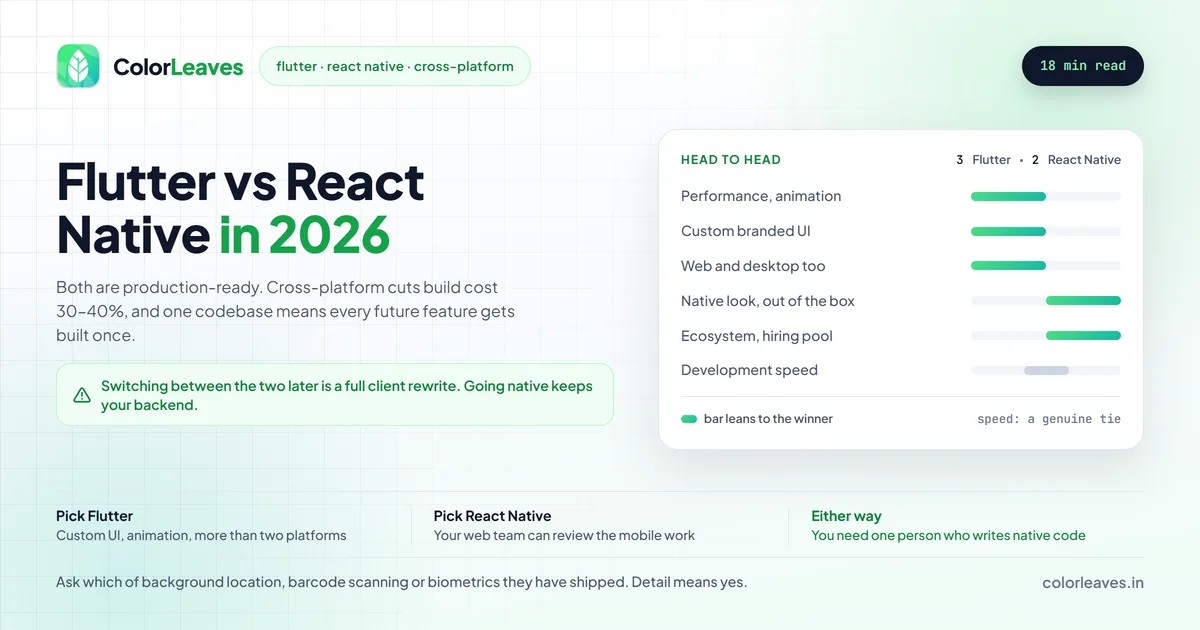
Key Takeaway: Pick Flutter if you want custom branded UIs, smooth animations, strong performance, or support across mobile, web, and desktop. Pick React Native if your team knows JavaScript, you need a native look, extensive third-party packages, or code sharing with a React web app. Both are production-ready.
We’ve built apps using both frameworks at Color Leaves, and this comparison draws from our practical experience delivering projects for clients across Pune and beyond.
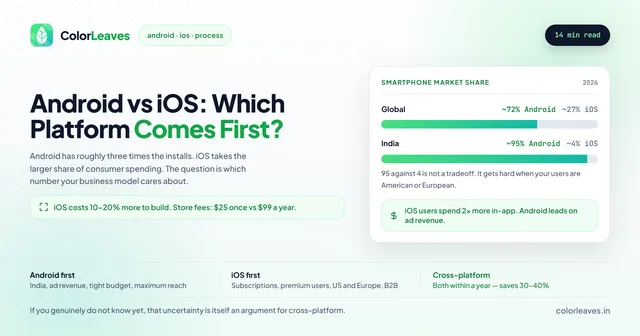
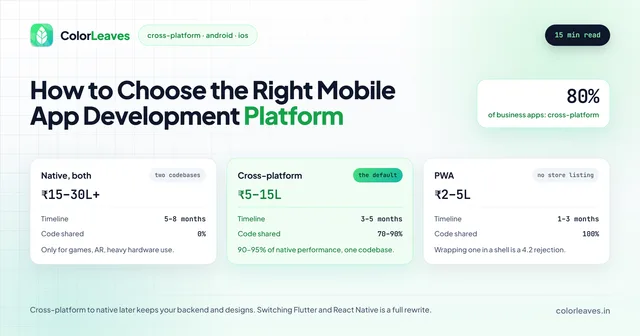
One framing point before the detail. This is the second question, not the first. Whether cross-platform suits you at all, against native or a web app, is the decision that actually moves your budget, and our guide to choosing a mobile platform covers it. If you have settled that and cross-platform won, read on.
Why Cross-Platform Development?
Here’s why cross-platform development has become the default choice for many businesses:
Cost Efficiency: Instead of maintaining separate iOS and Android codebases, you write once and deploy to both platforms. This typically reduces development costs by 30-40%.
Faster Time to Market: A single development team working on one codebase can ship features simultaneously to both platforms.
Consistent User Experience: Your app looks and behaves identically across platforms, strengthening your brand identity.
Easier Maintenance: Bug fixes and updates are implemented once, not twice.
For a deeper understanding of cross-platform development benefits, visit our cross-platform app development services.
What is Flutter?
Flutter is Google’s open-source UI toolkit for building natively compiled applications. Released in 2017, it has rapidly grown to become one of the most popular frameworks for mobile development.
How Flutter Works
Flutter uses Dart as its programming language and renders UI using its own graphics engine (Skia). Instead of using platform-native UI components, Flutter draws every pixel on the screen itself. This approach gives developers complete control over the UI.
Flutter Pros
Beautiful Custom UIs: Flutter excels at creating visually stunning, highly customized interfaces. Since it draws its own UI, you’re not limited by platform widget constraints.
Hot Reload: Make changes to your code and see them reflected instantly without losing app state. This dramatically speeds up the development process.
Strong Performance: Flutter compiles to native ARM code, delivering smooth 60fps animations and fast startup times.
Single Codebase for Everything: Beyond iOS and Android, Flutter now supports web, desktop (Windows, macOS, Linux), and embedded devices from a single codebase.
Large Widget Library: Flutter comes with an extensive collection of pre-built widgets that follow Material Design and Cupertino (iOS) design guidelines.
Growing Adoption: Major companies like Google Pay, BMW, Toyota, and Alibaba use Flutter in production.
Flutter Cons
Larger App Size: Flutter apps tend to be larger than their native counterparts (typically 10-20MB more) because the framework bundles its rendering engine.
Dart Learning Curve: If your team is unfamiliar with Dart, there’s a learning investment required. However, Dart is relatively easy to pick up for developers familiar with Java, JavaScript, or C#.
Younger Ecosystem: While growing rapidly, Flutter’s package ecosystem is smaller than React Native’s, and some third-party integrations may require more custom work.
Platform Look and Feel: Because Flutter draws its own UI, achieving a truly native look (especially on iOS) requires additional effort.
If you’re considering Flutter for your next project, our Flutter app development services in Pune cover everything from MVPs to complex enterprise apps.
What is React Native?
React Native is Meta’s (formerly Facebook) framework for building native mobile apps using JavaScript and React. Launched in 2015, it has a strong track record with some of the world’s most popular apps.
How React Native Works
React Native uses JavaScript to bridge with native platform components. Your React components map to actual iOS and Android UI elements, giving apps a native look and feel.
React Native Pros
JavaScript Ecosystem: React Native taps into the massive JavaScript ecosystem. If your team knows JavaScript and React, the learning curve is minimal.
Native Components: Apps use actual platform UI components, automatically getting the native look users expect on each platform.
Large Community: With millions of developers, React Native has extensive documentation, countless tutorials, and solutions for almost every problem you might encounter.
Mature Package Ecosystem: Need to integrate with a third-party service? There’s likely already a React Native package for it.
Code Sharing with Web: If you have a React web application, you can share significant business logic and some components with your mobile app. The bigger prize is usually review rather than reuse. Your existing web engineers can read and critique the mobile pull requests, which is quality control you do not otherwise get, and it matters most when the mobile work is done by an outside team, since it removes the usual problem of nobody on your side being able to judge what arrived.
Proven at Scale: Apps like Facebook, Instagram, Walmart, and Discord demonstrate React Native’s capability to handle demanding requirements.
React Native Cons
Bridge Performance Overhead: Communication between JavaScript and native code goes through a bridge, which can cause performance bottlenecks in complex scenarios.
Dependency on Native Modules: Some features require writing native code (Java/Kotlin for Android, Swift/Objective-C for iOS), which can complicate development.
Upgrade Challenges: Major React Native version upgrades have historically been painful, though this has improved with recent releases.
Debugging Complexity: Debugging can be challenging when issues span JavaScript and native code.
For projects that benefit from React Native’s strengths, we offer dedicated React Native app development services in Pune.
Head-to-Head Comparison
Let’s compare these frameworks across key factors that matter for your project:
Performance
| Aspect | Flutter | React Native |
|---|---|---|
| Rendering | Own engine (Skia) | Native components |
| Animation | Excellent (60fps) | Good (can drop frames) |
| Startup Time | Fast | Moderate |
| Memory Usage | Higher | Lower |
| CPU Intensive Tasks | Better | Requires native modules |
Winner: Flutter - Flutter’s direct compilation and custom rendering engine give it an edge in raw performance, especially for animation-heavy apps.
Worth keeping in proportion though. For the large majority of business apps the difference is not perceptible to users, and the performance problems that actually generate complaints have nothing to do with framework choice: full-resolution images loaded into a scrolling list, unbounded caches, work happening on the main thread. Those fail identically in both. Test on the hardware your users carry rather than on a flagship, which our piece on Android device fragmentation covers, and the framework comparison stops being the interesting variable.
Development Speed
| Aspect | Flutter | React Native |
|---|---|---|
| Hot Reload | Excellent | Good |
| Setup Time | Quick | Moderate |
| Initial Learning | Dart required | JS/React knowledge helps |
| UI Development | Fast with widgets | Fast with components |
| Third-party Integrations | Growing | Extensive |
Winner: Tie - Flutter’s hot reload is slightly faster, but React Native’s familiar JavaScript ecosystem can speed up development for teams already proficient in React.
UI/UX Capabilities
| Aspect | Flutter | React Native |
|---|---|---|
| Custom UI | Excellent | Good |
| Native Look | Requires effort | Built-in |
| Animation | Superior | Good |
| Consistency | Pixel-perfect | Platform variations |
| Design Systems | Material, Cupertino | Platform native |
Winner: Flutter for custom UIs, React Native for native feel - If your app needs a highly branded, custom interface, Flutter is superior. If you want apps that feel native to each platform, React Native is easier.
Ecosystem and Community
| Aspect | Flutter | React Native |
|---|---|---|
| GitHub Stars | 160k+ | 115k+ |
| Package Registry | pub.dev (~35k) | npm (thousands) |
| Stack Overflow Questions | Growing | Extensive |
| Corporate Backing | Meta | |
| Job Market | Growing fast | Established |
Winner: React Native - React Native’s longer history means more packages, more answered questions, and a larger talent pool. However, Flutter is catching up quickly.
Learning Curve
| For Developers With | Flutter | React Native |
|---|---|---|
| JavaScript/React Experience | Moderate | Easy |
| Java/Kotlin Experience | Moderate | Moderate |
| Swift Experience | Moderate | Moderate |
| No Mobile Experience | Moderate | Moderate |
Winner: Depends on background - React Native is easier if you know JavaScript. Flutter requires learning Dart but has excellent documentation.
Platform Support
| Platform | Flutter | React Native |
|---|---|---|
| iOS | Full | Full |
| Android | Full | Full |
| Web | Stable | Experimental |
| Windows | Stable | Community |
| macOS | Stable | Community |
| Linux | Stable | Community |
Winner: Flutter - Google has invested heavily in making Flutter truly cross-platform, with official support for six platforms from a single codebase.
Treat that win as conditional on actually wanting the extra platforms. Most businesses need iOS and Android and nothing else, and on those two the row reads Full against Full. Flutter’s web and desktop support is genuinely useful if you have a real need for a desktop tool or a shared web build, and it is worth nothing to a company shipping a phone app. Decide whether you are buying it before you count it as an advantage. Either way both frameworks produce the same store bundles, so our Play Console and Apple Developer account guides apply identically.
When to Choose Flutter
Flutter is the better choice when:
Your app needs custom, branded UI: If your design calls for unique animations, custom widgets, or a consistent look across platforms, Flutter’s rendering capabilities are unmatched.
You’re building for multiple platforms: If you need iOS, Android, web, and desktop apps, Flutter lets you target all from one codebase with official support.
Performance is critical: For apps with complex animations, games, or graphics-intensive features, Flutter’s direct rendering provides smoother performance.
You’re starting fresh: Without existing JavaScript/React expertise on your team, Flutter’s cohesive tooling and excellent documentation make it a great starting point.
Long-term Google ecosystem integration: If you’re building for Google’s ecosystem or anticipate strong future integration with Google services.
Flutter Success Stories
- Google Pay: Rebuilt portions of their app with Flutter for consistent experience
- BMW: Uses Flutter for their My BMW app
- Alibaba: Xianyu app serves millions with Flutter
- eBay Motors: Chose Flutter for their mobile experience
When to Choose React Native
React Native is the better choice when:
Your team knows JavaScript and React: Use existing skills instead of learning a new language. This reduces ramp-up time significantly.
You need extensive third-party integrations: React Native’s mature ecosystem means most services already have well-tested packages available.
Native look and feel is priority: If your app should look and behave exactly like native iOS and Android apps, React Native uses actual platform components.
You’re sharing code with a React web app: Business logic, utilities, and some components can be shared between React and React Native projects.
You need to hire quickly: The React Native talent pool is larger, making it easier to scale your team.
React Native Success Stories
- Instagram: Uses React Native for major features
- Walmart: Rebuilt their apps with React Native
- Discord: Powers their mobile experience
- Shopify: Chose React Native for their mobile apps
Closer to home, we used React Native to build StockGenie, an AI stock analysis app that went from nothing to live on Google Play in two months with a team of four. The single codebase is the main reason that timeline was possible.
Real-World Considerations
Team Composition
Consider your current team’s expertise:
- Web developers with React experience: React Native will feel familiar
- Mobile developers from native background: Either works, but Flutter’s typed language may feel more comfortable
- New team being built: Consider the local talent market and long-term hiring needs
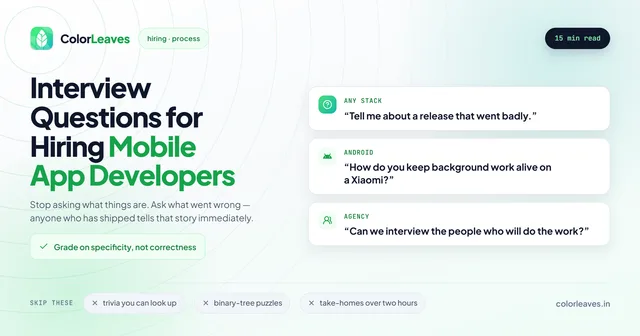
The first of those is worth more weight than it usually gets. If you already employ React web engineers, React Native is the only mobile stack where your own team can properly review the mobile work. That changes the risk of an outside hire more than any performance benchmark in this article, and it is the single strongest argument either way for most companies. Our page on hiring React Native developers in India covers that, and our interview questions for mobile developers include the ones that separate somebody who has maintained a React Native app from somebody who has only started one.
For the third case, the Indian talent market has a shape worth knowing. Flutter benches here run deeper than most overseas teams expect, largely because Google pushed it hard through the Indian training market, so those roles fill faster than the global picture suggests. React Native benefits from every JavaScript developer being a partial candidate. Both fill considerably faster than native iOS. Our cost to hire developers guide covers the rate bands by stack, and how to hire app developers in India covers the process.
Whichever you pick, you need at least one person who can write and debug native code, because every cross-platform project eventually meets a requirement no package covers. Confirm that before you sign rather than discovering it in month four.
Project Timeline
- Tight deadline with experienced React team: React Native
- Tight deadline with no preference: Flutter (faster setup, extensive widgets)
- Long-term project: Either works well
Budget Constraints
Both frameworks are free and open-source. Cost differences come from:
- Developer salaries (React Native developers are currently more available)
- Third-party services and packages
- Potential native module development
App Complexity
- Simple to medium apps: Either framework works excellently
- Complex UI with animations: Flutter has an edge
- Heavy native integrations: React Native may require less custom work
The Things That Actually Break, in Either Framework
Both frameworks handle the happy path well. These are where cross-platform projects genuinely struggle, and they are worth checking with any team before you commit.
Background location. The hardest of the lot, and the one that decides whether a delivery or transit product works. Both frameworks lean on native code here, and on Android you are then fighting manufacturer power management that kills background work within minutes. Our on-demand cost guide covers what that costs to get right, and Android device fragmentation covers the mitigations.
Barcode and QR scanning. Fine with the right library and poor with the wrong one, and the difference only shows on cheap hardware under bad lighting. If your product depends on it, as factory and warehouse apps do, ask to see it working on your actual devices before you commit.
Secure storage and biometrics. Keychain and Keystore behave differently and the abstractions leak. For anything financial or medical, certificate pinning and root detection also sit close to the platform, and getting them subtly wrong in a cross-platform networking layer is easy.
Large scrolling lists of images. The classic memory failure on 3GB Android devices, and the thing that makes a shopping app unusable for exactly the customers you spent money acquiring.
None of these argue against cross-platform. They argue for asking a specific question: which of these has your team done before, and can we see it. A firm that answers with detail has shipped. A firm that says both frameworks handle it fine has not.
Our Recommendation
At Color Leaves, we work with both frameworks and recommend based on project requirements:
Choose Flutter if:
- Custom UI/UX is a priority
- You need multi-platform support beyond mobile
- Performance and smooth animations are essential
- You’re open to learning Dart
Choose React Native if:
- Your team has JavaScript/React expertise
- You need a native platform look
- Third-party integrations are extensive
- You’re sharing code with a React web app
For most business apps in 2026, both frameworks can deliver excellent results. The “wrong” choice between these two is rarely catastrophic. Both are production-ready and well-supported.
Worth being precise about that, though, because it is the one decision here that is genuinely expensive to reverse. Moving from cross-platform to native later keeps your backend, your API contracts, your designs and everything you learned, so it is a client rewrite rather than a restart. Switching between Flutter and React Native is a full rewrite of the client with none of that consolation. Our guide to choosing a mobile platform covers the reversibility of each path. So “rarely catastrophic” means the app will work either way. It does not mean you should flip a coin.
The maintenance argument matters more than the launch one. One codebase means every subsequent feature gets built once for the life of the product, and our maintenance cost guide covers the annual figure that gets doubled if you go native on both. The one dependency cross-platform adds is that you occasionally wait on a framework release before you can bump to a new target API level, which Google raises annually whether or not it suits you.
If you’re still unsure which framework suits your project, contact our team for a free consultation. We’ll analyze your requirements and recommend the approach that best fits your goals, timeline, and budget.
Getting Started with Cross-Platform Development
Ready to build your app? Here’s how to move forward:
- Define your requirements: List features, target platforms, and timeline
- Evaluate your team: Assess existing skills and hiring plans
- Consider your UI needs: Custom branded vs. native look
- Review third-party needs: Check package availability for both frameworks
- Start small: Build a proof of concept in your chosen framework
Learn more about our approach to cross-platform development on our Cross-Platform App Development page, or explore our Android and iOS development services.
Related Reading
Planning your budget? Our app development cost guide covers pricing for cross-platform vs native development, and the development timeline guide covers the schedule side including the delays that are not development at all. For e-commerce projects specifically, check the e-commerce app development cost breakdown. If you’re deciding between platforms before choosing a framework, read Android vs iOS: Which platform first?, and if you’re building a first version rather than a full product, our MVP costing guide is the more useful starting point.
Whichever framework you pick, the store side is identical. A Flutter build and a React Native build produce the same bundle a native one does, so our Apple Developer account and Play Console guides apply either way, as does everything in why apps get rejected.
Frequently Asked Questions
Is Flutter better than React Native in 2026?
Neither is universally “better.” Flutter excels at custom UIs and multi-platform support, while React Native leverages JavaScript expertise and has a more mature ecosystem. Choose based on your project requirements and team skills.
Can I switch from React Native to Flutter later?
Yes, but it requires a rewrite. Both frameworks have different architectures and languages. Plan to rebuild rather than migrate if you switch frameworks.
Which framework has better job prospects?
React Native currently has more job listings due to its longer presence in the market. However, Flutter demand is growing rapidly, and skilled Flutter developers are harder to find, potentially commanding higher salaries.
Do big companies use Flutter or React Native?
Both. Google, BMW, and Alibaba use Flutter. Meta, Walmart, and Shopify use React Native. Framework choice depends on specific project needs rather than company size.
Which is easier to learn for beginners?
If you know JavaScript, React Native is easier. If you’re starting fresh, many find Flutter’s documentation and tooling more beginner-friendly, despite needing to learn Dart.
Can I build games with these frameworks?
Flutter is better suited for casual 2D games with its Flame game engine. For complex games, native development or dedicated game engines (Unity, Unreal) are better choices. React Native isn’t designed for game development.
Ready to Build?
Picking the framework is the easy half. Finding a team that will tell you honestly when your choice is wrong is the harder part.
We build in both, which is the only reason our recommendation is worth anything. If you’re weighing the two, start with the hybrid app development overview, which sets the frameworks against each other on cost, hiring and interface work. If you’ve already decided, go straight to Flutter app development or React Native app development. Companies working within India can read about our cross-platform development in Pune instead.