Picking which platform to build first is one of the bigger early decisions you’ll make. Android owns most of the global market. iOS users spend more and stick around longer. So which one wins for your app? That depends on who you’re building for, and this guide walks through how to figure it out.
Key Takeaway: Build Android first if your market is India or other developing regions, your budget is tight, or you need maximum reach. Build iOS first for premium users, subscription products, or US and Europe markets. Need both from day one? Go cross-platform.
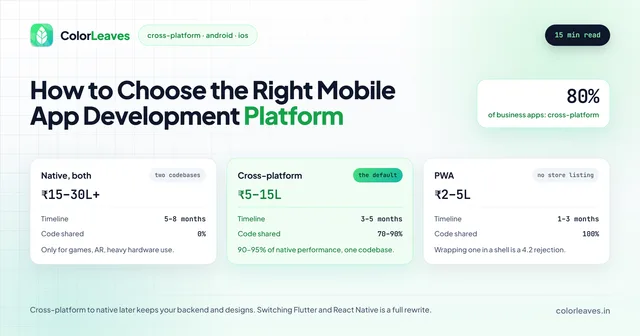
This is the narrower version of a bigger question. If you have not yet settled whether to go native at all, choosing a mobile platform covers native against cross-platform against a web app first, and for most business products the answer there makes this article academic.
The Mobile Platform Landscape in 2026
Look at the current market before you commit to a platform.
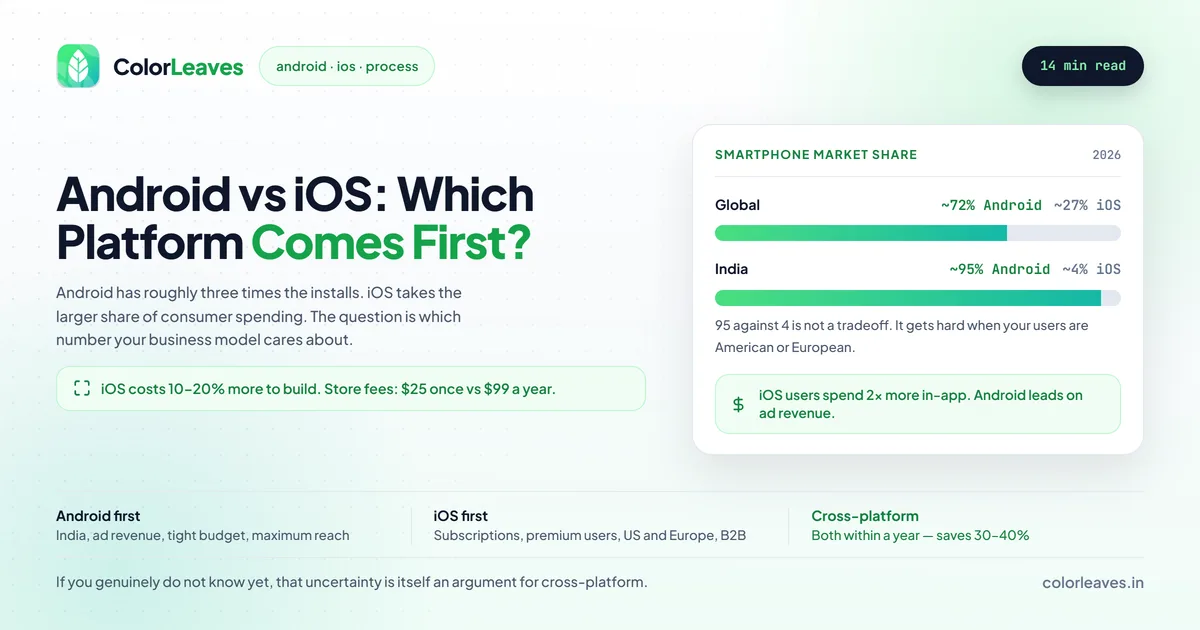
Global Market Share
- Android: ~72% global smartphone market share
- iOS: ~27% global smartphone market share
India-Specific Numbers
- Android: ~95% market share
- iOS: ~4% market share
Revenue Generation
- iOS users spend 2x more on in-app purchases
- Android leads in ad-revenue based models
- iOS App Store generates higher per-user revenue
That last group of numbers is the one that decides most of these arguments, and it is worth stating the asymmetry plainly. Android has roughly three times the install base and iOS takes the larger share of consumer app spending. So the honest framing is not “which platform is bigger” but “which number does your business model care about”. If you charge users, follow the spending. If you monetise attention or need scale to work at all, follow the installs.
For an Indian audience the question barely arises, because 95 percent against 4 percent is not a tradeoff. It gets genuinely difficult when your users are American or European, or when they are split.
Android App Development: Pros and Cons
Advantages of Android
1. Massive User Base There are more than 3 billion active Android devices out there, so you reach the largest mobile audience by far. In India, Android sits at 95% market share (StatCounter). If your users are in India, you can’t skip Android.
2. Easier App Store Approval Google Play Store goes easier on you during review:
- Faster review times (typically hours to 2-3 days)
- More flexible app guidelines
- Easier to update and iterate quickly
3. Open Ecosystem Android’s openness pays off in a few ways:
- Greater customization options
- Direct APK distribution outside Play Store
- More flexibility in app functionality
- Access to device hardware features
4. Lower Development Costs
- Free development tools (Android Studio)
- One-time Play Store fee ($25)
- More affordable testing devices
- Larger pool of developers available
The last point matters more than the first three combined. Android and Kotlin is the deepest talent pool in India by a distance, so those roles fill fastest and price most competitively, which our page on hiring Android developers in India covers. Native iOS roles take longer to fill and cost more for the same seniority. If you are staffing rather than buying a build, that difference shows up in your schedule as well as your budget.
5. Diverse Hardware Options Android runs on a wide spread of devices:
- Smartphones (entry-level to flagship)
- Tablets
- Smart TVs
- Wearables
- Automotive systems
Disadvantages of Android
1. Device Fragmentation You’re dealing with thousands of device models:
- Multiple screen sizes to support
- Various Android versions (OS fragmentation)
- Different hardware capabilities
- Longer testing cycles required
This is the real cost of Android and it is usually understated. The screen sizes are the easy part. What actually generates one star reviews is manufacturer battery management killing background work on Xiaomi and Oppo devices, and memory ceilings on 3GB hardware that no emulator reproduces. Our piece on Android device fragmentation covers building a matrix of five or six devices that catches most of it, and budgeting 15 to 25 percent of Android engineering effort for verification is the honest figure. Any estimate treating Android and iOS testing as equivalent is wrong.
2. Lower Average Revenue Per User
- Android users spend less on apps
- Higher percentage of free app downloads
- More price-sensitive user base
3. Security Concerns
- More vulnerable to malware
- Sideloading risks
- Delayed security updates on some devices
iOS App Development: Pros and Cons
Advantages of iOS
1. Higher Revenue Potential iOS users open their wallets more readily:
- 2x higher in-app spending
- Better subscription conversion rates
- Premium user demographic
- Higher engagement rates
2. Consistent User Experience Fewer device types means:
- Fewer devices to test
- Predictable performance
- Consistent UI across devices
- Faster development cycles
3. Early Adopter Audience iOS users lean toward this behavior:
- Adopt new technologies faster
- Provide valuable early feedback
- Be more engaged with apps
- Share apps more frequently
4. Security and Privacy
- Strict App Store review process
- Regular security updates
- Unified update distribution
- Privacy-focused features
5. Brand Perception
- Premium brand association
- Tech-savvy user base
- Higher brand loyalty
- Better for B2B applications
Disadvantages of iOS
1. Strict App Store Guidelines Apple’s review can be a slog:
- Longer review times (1-7 days)
- Stricter content guidelines
- Possibility of rejection
- Complex compliance requirements
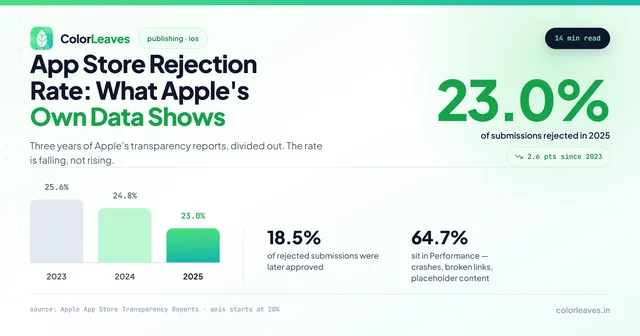
Apple’s own transparency reports put the rejection rate at roughly one in four submissions, and nearly one in five rejections is later approved after a fix, so a rejection is a delay rather than a verdict. Most of it is avoidable: two thirds of rejections sit in the Performance category, which is crashes and incomplete information rather than judgement calls. Our guide to why apps get rejected covers the specific guidelines, and the practical answer is to budget a review cycle rather than a review.
2. Higher Development Costs
- Mac required for development
- Annual developer fee ($99/year)
- More expensive testing devices
- Higher hourly rates for iOS developers
The store fees are noise next to the build, but they differ in kind rather than amount. Google charges $25 once and never again. Apple charges $99 every year, and if that renewal fails your apps are removed from the App Store until you pay. Over five years that is roughly ₹41,500 against ₹2,100, which still should not decide anything.
The Mac requirement is more real than the fee. Xcode runs only on macOS, and no cross-platform framework changes that. The rate difference is real too: Swift talent prices higher in India than anything else because the pool is smaller, which our cost to hire developers guide sets out by stack.
3. Limited Market in Developing Countries
- Small market share in India, Southeast Asia
- Price barrier for iPhone adoption
- Android preference in emerging markets
4. Less Customization
- Closed ecosystem
- Limited hardware access
- Stricter design guidelines
- No sideloading options
Comparison Table: Android vs iOS
| Factor | Android | iOS |
|---|---|---|
| Global Market Share | ~72% | ~27% |
| India Market Share | ~95% | ~4% |
| Development Cost | Lower | Higher |
| Time to Market | Similar | Similar |
| Revenue Per User | Lower | Higher |
| App Store Approval | Easier | Stricter |
| Device Fragmentation | High | Low |
| Development Tools | Android Studio (Free) | Xcode (Free, Mac only) |
| Store Fee | $25 (one-time) | $99/year |
| Testing Complexity | Higher | Lower |
Key Decision Factors
1. Target Audience
Choose Android if:
- Targeting India or developing markets
- Building for mass-market consumers
- Focusing on budget-conscious users
- Need maximum reach
Choose iOS if:
- Targeting premium users
- US, Europe, or developed markets focus
- B2B or enterprise applications
- Users willing to pay for quality
2. Revenue Model
Android works better for:
- Ad-supported apps
- Freemium models
- High-volume, low-margin apps
- Services with large user bases
iOS works better for:
- Paid apps
- In-app purchases
- Subscription models
- Premium services
3. Budget Constraints
Limited Budget: Start with Android
- Lower development environment costs
- Cheaper testing devices
- Larger developer pool
- One-time store fee
Adequate Budget: Consider iOS first
- Higher potential ROI
- Faster development cycles
- Easier to maintain
- Premium market positioning
If budget is genuinely the binding constraint, the more useful move is narrowing the feature set rather than the platform. A well-built MVP on one platform outperforms a thin app on two, and our MVP development page covers scoping one that proves something rather than just existing. Cutting the platform and keeping the feature list is the more common mistake, and it produces an app that reaches half the market and still does not work well.
What Launching One First Actually Costs You
The part nobody prices, and it is the strongest argument for cross-platform in a lot of cases.
Choosing one platform first is rarely choosing one platform forever. Most products end up on both, so the real comparison is not Android against iOS. It is one native app now and a second native app in a year, against one cross-platform codebase covering both.
Two native codebases means every feature after the second launch gets built twice, tested twice and released twice, for the life of the product. That compounds. A three-year view usually shows a larger gap in ongoing cost than the difference at launch, and our maintenance cost guide covers the annual figure that gets doubled.
There is also drift. Two teams building the same feature produce two subtly different products, and reconciling them later is nobody’s favourite quarter.
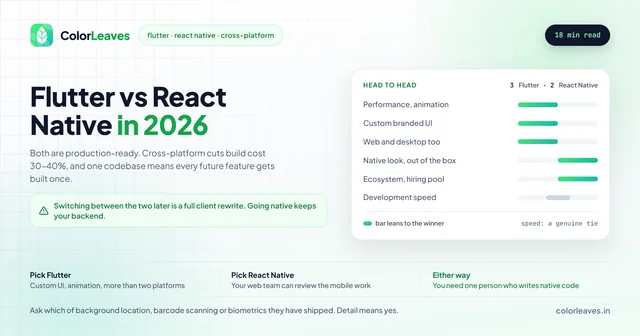
So the sequencing question has three honest answers. If you will realistically only ever serve one platform, go native and go fast. If you know both are coming within a year, cross-platform almost always wins on total cost, with Flutter versus React Native covering which. And if you genuinely do not know yet, that uncertainty is itself an argument for cross-platform, because it is the option that costs least to be wrong about.
4. Time to Market
Build timelines run close to even, with a few wrinkles:
- Android: more testing time because of fragmentation
- iOS: approval can drag on longer
- Cross-platform: fastest way to hit both at once
5. App Type
Android preferred for:
- Utility and productivity apps
- Entertainment and media apps
- Social networking apps
- Gaming (ad-based)
iOS preferred for:
- Lifestyle and health apps
- Finance and business apps
- Premium games
- Enterprise solutions
Treat that list as a tendency rather than a rule, and check it against your own market. A healthcare product built for Indian patients belongs on Android regardless of what the global pattern says, because that is where the patients are. A fintech app aimed at Indian UPI users is the same. The list describes Western spending patterns, and it stops applying the moment your users are somewhere else.
The Cross-Platform Alternative
Still stuck? Cross-platform development is a real option.
React Native
- JavaScript-based
- Large developer community
- Code sharing up to 90%
- Used by Facebook, Instagram, Airbnb
Flutter
- Dart programming language
- Excellent performance
- Beautiful custom UI
- Growing ecosystem
Benefits of Cross-Platform:
- 30-40% cost savings
- Single codebase
- Simultaneous launch on both platforms
- Easier maintenance
Learn more about cross-platform development
Case Studies: Platform Choice Success Stories
Case 1: E-commerce App in India
Choice: Android First
- Target: Indian mass market
- Result: 2 million downloads in 6 months
- Later expanded to iOS for premium users
The pattern generalises to most ecommerce builds aimed at India: reach first, then follow the spending. What that path costs is a second codebase, which is the tradeoff described above.
Case 2: Fitness Subscription App
Choice: iOS First
- Target: Health-conscious premium users
- Result: 60% subscription conversion rate
- Android version launched after market validation
Case 3: On-Demand Service Platform
Choice: Cross-Platform (React Native)
- Target: Both platforms simultaneously
- Result: 40% cost savings, faster time to market
- Unified user experience
Our Recommendation
After 10+ years as a mobile app development company in Pune, here’s how we steer clients on platform choice.
Start with Android if:
- Your primary market is India
- You’re building an MVP to test the market
- Budget is a primary constraint
- Your revenue model is ad-based
- You need maximum reach quickly
Start with iOS if:
- Targeting premium user segment
- Building a subscription-based product
- Need faster development cycles
- B2B or enterprise focus
- Western markets are primary target
Go Cross-Platform if:
- Need both platforms from day one
- Budget is moderate
- Team has JavaScript or Dart experience
- Speed to market is critical
- Long-term maintenance is a concern
Making Your Final Decision
Run through these questions before you commit:
-
Who is your target user? Know their location, age, and which phones they actually carry.
-
What’s your monetization strategy? Match your revenue model to how each platform’s users behave.
-
What’s your budget? Be honest about both the build cost and what you’ll spend keeping the app running.
-
What’s your timeline? Account for development plus review time.
-
What’s your long-term vision? You’ll probably end up on both platforms eventually, so plan for it.
Conclusion
There’s no single right answer here. The call comes down to your goals, your users, your budget, and your timeline.
If your market is India, start with Android. The market share alone settles it. Building a premium product or selling into the US and Europe? iOS usually returns more per user. Need both from the start? Cross-platform splits the difference well.
At Color Leaves, we help businesses sort through exactly this. Pick Android, iOS, or cross-platform, and our team ships apps that do the job. You can see what we have built, including StockGenie, a React Native finance app that went to both stores from one codebase.
Whichever way you go, budget the schedule properly. Our development timeline guide covers where the weeks go, including the delays that are not development at all.
Got an app idea? Contact us for a free consultation.
Related Guides
Once you’ve chosen your platform, these guides will help you plan: how to build your first mobile app (step-by-step for beginners), Flutter vs React Native comparison (if you’re going cross-platform), and app development costs in India for budgeting. Considering publishing? Read about Play Store and App Store publishing costs.
Frequently Asked Questions
Should I build for Android or iOS first?
Your market and business model decide it. Targeting India or other developing markets? Go Android. Selling to premium users or running subscriptions? iOS tends to pay off more.
Is it more expensive to develop for iOS or Android?
iOS runs about 10 to 20% more, mostly because of the Mac you need and the annual developer fee. The flip side: iOS apps often pull in more revenue per user.
Can I build for both platforms at once?
Yes. Cross-platform frameworks like React Native or Flutter let you ship to both from one codebase, which cuts development costs by 30 to 40%.
Which platform has better user engagement?
iOS, generally. Those users log longer sessions and convert better on paid features.
How long does it take to develop an app for each platform?
Roughly the same, 2 to 6 months depending on how complex the app is. Android usually eats more testing time thanks to device fragmentation.
Once You’ve Picked a Side
The decision only matters if you then build it properly, and each platform punishes different mistakes. Android will humble you on device fragmentation, OEM battery managers and memory ceilings on cheap hardware. iOS will humble you at App Review, where roughly a fifth of submissions get rejected over privacy labels, account deletion or a missing Sign in with Apple option.
Our Android app development in India page goes into the fragmentation problem properly, and iOS app development in India covers the review guidelines that catch teams out. If the honest answer is that you need both within a year, cross-platform development costs considerably less than maintaining two native codebases for the life of the product.