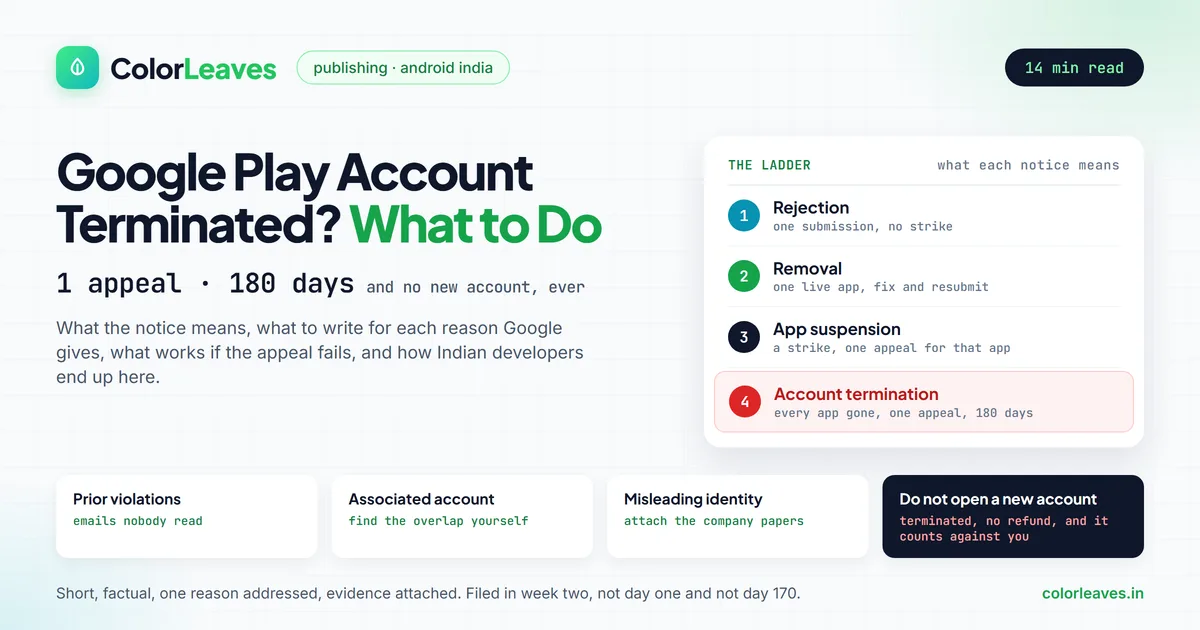
A Google Play developer account terminated by email at 2 a.m. is one of the worst mornings an Indian app business can have. Every app you published is gone from the store, the $25 is not coming back, and the notice tells you not to open another account. It also tells you that you may appeal once.
That one appeal is the whole game, and most people waste it within the hour. They reply angry, or generic, or they open a fresh account on a colleague’s Gmail and get that one terminated too, which hardens the record against them. This guide is the calm version of what to do, written for developers and founders in India, where a large share of terminations trace back to a handful of avoidable patterns: loan apps, agencies publishing under one shared account, bought Play Console accounts, and policy emails nobody read. It covers what the notice actually means, the 180-day appeal window Google introduced in January 2026, what to write for each termination reason, what your options are if the appeal fails, and how to make sure it never happens to the next account. If you still have an account in good standing and want to keep it that way, skip to the prevention section, or read our Play Console setup guide, which covers the account from the beginning.
Key Takeaway: You get one appeal per termination, filed through the form in the termination email, and from 28 January 2026 it must go in within 180 days. Do not open a new account; Google terminates those without refund and treats the attempt as evidence. Read the notice for the exact reason, fix what it names, and write a short, factual appeal that addresses that reason and nothing else. If the reason is an associated account, list every overlap yourself before Google does.
Suspended, Removed, or Terminated: Which One You Got
The words matter, because Google uses four different actions and people describe all of them as “banned”. Read the subject line and the first paragraph of the email before doing anything.
| Action | What happened | Your other apps | What to do |
|---|---|---|---|
| Rejection | One update or new app failed review | Untouched | Fix the issue and resubmit. No strike. |
| Removal | One live app taken down for a violation | Untouched | Fix and resubmit. May count against you. |
| App suspension | One app taken down for a serious or repeated violation | Untouched, but the account is now on notice | One appeal for that app. A strike against the account. |
| Account termination | The whole developer account closed | All removed from Google Play | One appeal within 180 days. Do not open a new account. |
Google’s own enforcement page describes the ladder plainly: multiple removals or warnings may lead to an app suspension, and multiple suspensions, or a single violation Google considers egregious, may lead to account termination. There is no published number of strikes. Two suspensions have ended accounts; some accounts survive more. What is published is that Google is not required to warn you first.
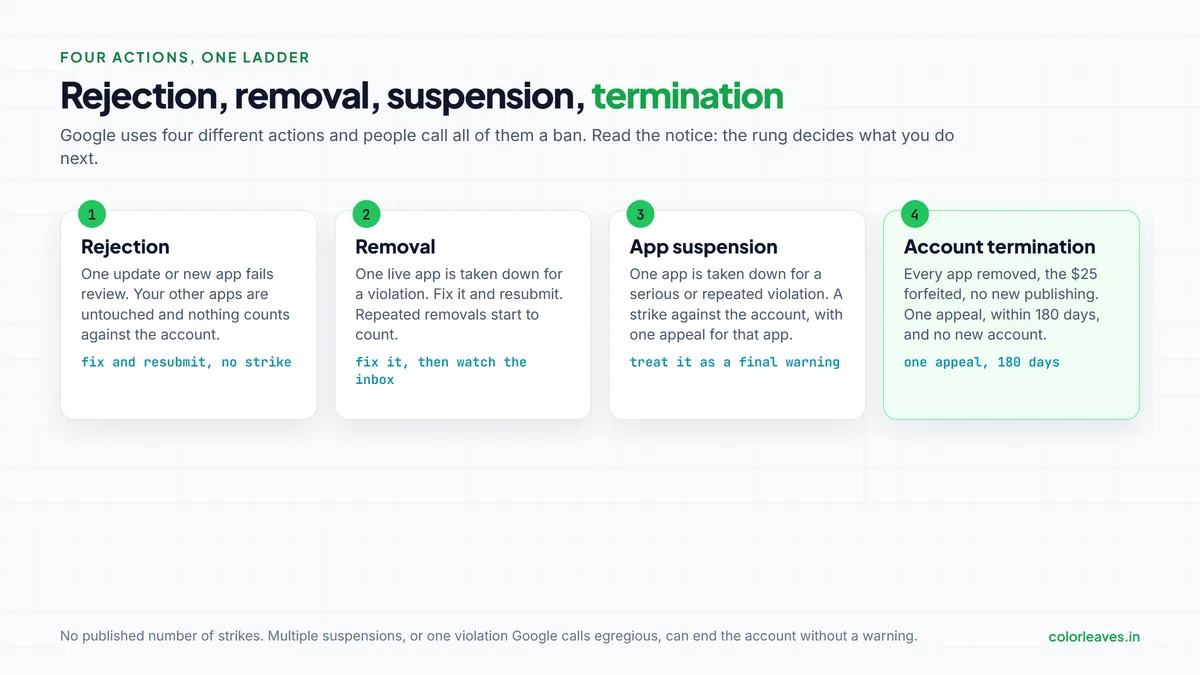
If you got a suspension rather than a termination, you still have an account. Treat it as a final warning: appeal that app with care, read every policy email in the account’s history, and fix anything similar in your other apps before Google’s next sweep finds it.
Why Google Terminates Accounts
The termination email quotes the Developer Distribution Agreement, usually its termination clauses, and gives a one-line reason. In practice the reason is one of five, and each needs a different appeal.
| Wording in the notice | What it usually means |
|---|---|
| Prior violations by this or associated accounts | Earlier policy emails, often about an app you forgot, were never acted on |
| Multiple violations | Several removals or suspensions across your apps |
| Associated account | Google links your account to one that was already terminated |
| High-risk behaviour or pattern of abuse | Automated systems flagged the account, often with no app-level warning |
| Misleading developer name or identity | The registered name, documents or branding did not match |
The associated-account reason is the one that catches honest people. Google links accounts by the signals it can see: the same payment card or payments profile, the same device used to log in, the same phone number, the same registered address, shared signing keys or app code, the same contact email domain, overlapping team members. An agency that published for a client who was later terminated can be linked to that client. A freelancer who once logged into a friend’s console from their own laptop can be linked to that friend. The link is made by systems, and the appeal is where a human sees it.
Three patterns account for a large share of terminations we hear about from Indian developers.
Loan and financial apps. Google’s personal loan policy in India requires the app to be published by an RBI-regulated entity or to declare its lending partners with licence details, and it enforces it hard. An app that touches lending without that paperwork is a fast route to the account level, not just the app level. Our fintech cost guide covers what compliant lending builds involve.
One agency account holding many clients’ apps. When one client’s app breaks a policy, the account and every other client on it are exposed. Several of the terminations we have been asked to help with started with an app the agency did not even build, inherited from a previous vendor. The fix is structural and we cover it below: the account belongs to the client, always.
Bought accounts. Telegram sellers offer verified Play Console accounts for a few thousand rupees. The identity on the account is not yours, Google detects the mismatch, and the termination that follows links your devices and payment details to a fraud pattern. We cover why in the Play Console setup guide, and the short version is that every person we know who did this lost both the bought account and their own.
The First 48 Hours
What you do before writing the appeal matters as much as the appeal.
Do not create a new developer account. Not on your personal Gmail, not on a co-founder’s, not on a new company email. Google’s enforcement page says new accounts opened after a termination will be terminated without refund, and the attempt becomes a new association on your record. People do this on day one out of panic and it is the single most damaging move available.
Do not email Google support or reply to the termination email. Neither route reaches the team that decides appeals. The only channel is the appeal form linked from the notice, which opens from the Play Console termination troubleshooter and needs Account owner or Admin access.
Do not post the story on social media yet. It changes nothing with Google and it fixes your public account of events before you have read your own history.
Do read every email Google ever sent to the account’s registered addresses. Search for “googleplay-noreply” and “Action required”. Most “prior violations” terminations have a trail of warnings sent to an address nobody monitored, and you cannot write an honest appeal without knowing what Google already told you. If an agency opened the account, get access to that inbox today; an agency that will not hand it over is telling you something, and our guide to choosing an app development company covers how to avoid that vendor next time.
Do collect what you can from outside the console. Your signing keystore and upload key, the store listing text and screenshots, the privacy policy, the data safety answers, the analytics exports, the invoices for the registration fee, the company documents used for verification. Terminated accounts lose console access, so this comes from your own records, which is one more reason to keep them.
Do write down the facts while they are fresh: which apps were on the account, which had policy emails, who had access, which devices and payment methods were used, and whether anyone on the team has ever had any other Play account in any capacity.
The Appeal: One Chance and a 180-Day Clock
Google allows one appeal per account termination. Since 28 January 2026 there is also a deadline: the appeal must be submitted within 180 days of the termination date, after which Google considers the matter closed and removes the option. Accounts terminated before that date got a one-time grace period to 27 July 2026, which has now passed. If you file close to the end of the window and are refused, you automatically get 30 more days after the decision to reply with new information for re-review.
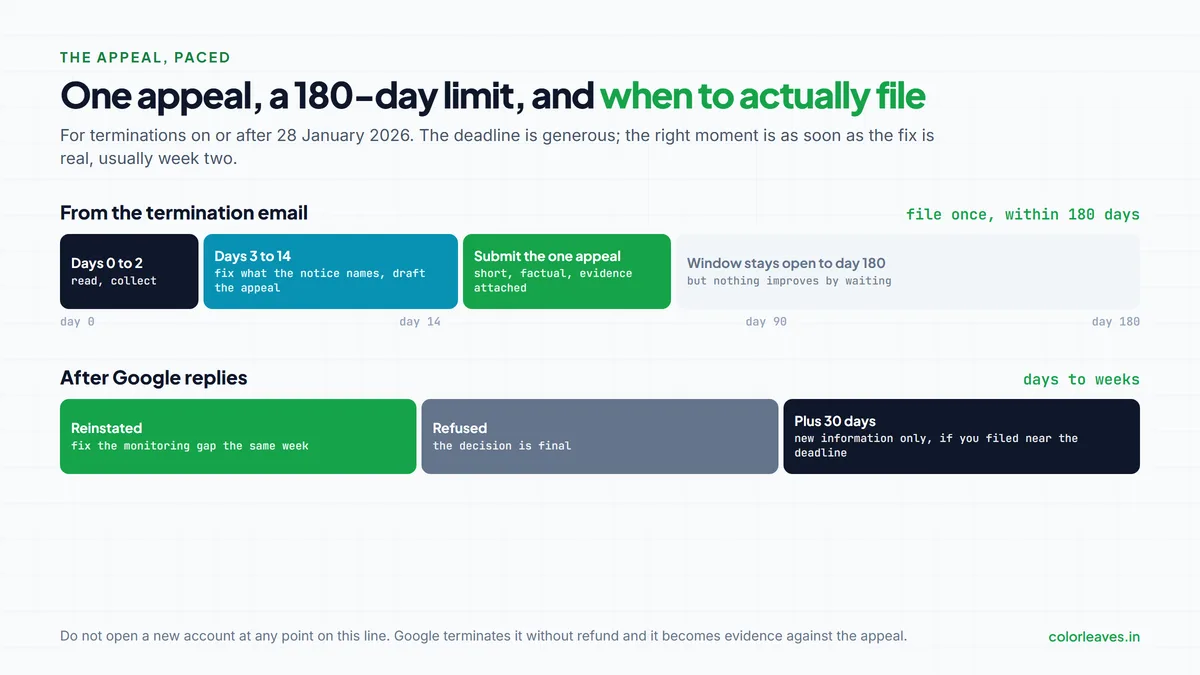
The deadline is generous and that is the trap. The right moment to appeal is not day one and not day 170. It is as soon as you have read your history, fixed what the notice names, and can show it. For most people that is one to two weeks.
Before you write, decide what you are asking for. Google says it reinstates accounts in appropriate circumstances, including where an error was made and the account does not actually violate the policies. So the appeal has to do one of two things: show that Google got a fact wrong, or show that the violation happened, is understood, and has been fixed in a way that cannot recur. “I was not aware” is neither.
Keep it short. A few hundred words, in plain English, with the facts first. State the reason given, address that reason directly, and attach or describe evidence: the policy email you acted on and when, the version that fixed it (built and run through an internal test track so you can name the version code), the documents that prove the registered identity, the list of overlaps you found yourself. A reviewer reads a great many of these; the ones that get a second look are the ones that make the reviewer’s job easy.
Leave out the business impact, the employees who will lose their jobs, and how long you have been a loyal developer. The reviewer cannot act on any of it. Leave out accusations and threats of legal action, which move the appeal to a different queue, not a faster one. And do not submit the appeal twice or from two accounts, which reads as exactly the multiple-account behaviour you may be trying to disprove.
What to Write for Each Reason
The notice tells you which of these you are writing.
Prior or multiple violations
List every policy email the account ever received, by app and date, and what was done about each. Where nothing was done, say so and say what has now been done: the app updated, the permission removed, the SDK replaced, the content changed, the app unpublished. Where a violation sits in an app you no longer want, say you will not republish it. The appeal should read like a closed ticket list, not a defence. If the pattern was a monitoring failure, name the fix: the contact email is now a shared inbox checked daily, and policy emails go to a named person.
Associated account
This one needs the most work and gets the least. Google will not tell you which account it linked yours to, so you have to find the overlap. Go through every signal: has anyone on the team held another Play account, including a terminated one, a student project, a previous employer’s, a friend’s they once logged into? Has the payment card, the payments profile, the phone number, the address, the device or the office network been shared with any other account? Did an agency or freelancer with access to your console also have access to others? List what you find, explain each one, and show separation: the shared card replaced, the contractor’s access removed on a stated date, the device no longer used. Shared console access is one of the quieter risks of offshore and outsourced development, and this is where it surfaces. If you genuinely find nothing, say that, describe what you checked, and ask Google to re-examine the link. A reviewer who sees you have done the investigation is more likely to do their own.
Misleading developer name or identity
Attach the documents: the company’s certificate of incorporation, GST registration, PAN, the D-U-N-S record for organisation accounts, and a short explanation of any mismatch between the developer name, the legal name and the brand. Trading names are common in India and reviewers do not know yours. If the account was registered under a person’s name but publishes a company’s apps, that mismatch is the problem, and the honest fix is usually to accept it and plan a correctly registered organisation account once the matter is closed, rather than argue the point.
High-risk behaviour
The vaguest reason and the hardest to answer, because it is often a systems decision. Address the things that look risky from outside: apps with near-identical code uploaded in quick succession, a burst of apps in a sensitive category, a payments profile that changed recently, logins from many locations, an account created and used to publish within days, permissions or SDKs associated with abuse. Explain each with the business reason and show the change. If the account was new, say what the business is, with a website, a GST number and a team page a reviewer can check. A brand-new account that publishes a first MVP and nothing else rarely trips this; six near-identical apps in a fortnight does.
If the Appeal Fails
Google’s decision on the one appeal is, in its own words, final, and the reply often says so in a sentence. The extra 30 days exist only for new information, not for a better-written version of the same case. So be honest with yourself about the options, because none of them is good and some of them are worse than nothing.
Opening a new account under the same people, devices or payment details is the worse-than-nothing option. It will be found and terminated, and it extends the association to whoever helped. A different legal entity with different directors, different devices and different payment methods is not prohibited in itself, but if Google links it to the terminated account through any of the signals above, the same happens, and you will have spent another $25 learning it. Do not ask a friend to publish your apps under their account for the same reason: you are handing them your risk, and if your app is the problem it takes their account down with it.
Outside Google there is less than people hope. Indian startups have taken terminations to the Competition Commission of India as part of the wider Play Store cases, and the CCI has fined Google over billing practices, but no individual developer has had an account reinstated that way. A legal notice to Google India produces a reply from a law firm and, in our experience, no change. Consumer forums have not treated a developer account as a consumer purchase.
What does work is the thing nobody wants to hear: distributing the app another way while the business decides what to do next. A web app reaches every phone with no store at all, and for a product that is mostly forms and content it may be enough. Indus Appstore and the manufacturer stores list Android apps independently of Google Play. Direct APK distribution from your own site works for business tools used by a known set of people, which is how most factory and field apps ship anyway. And iOS continues to exist; nothing about a Play termination touches the App Store, and an iOS build of the same product is sometimes the quickest route back to paying users. We have rebuilt distribution this way for two clients and both are still trading.
How to Never Be Here Again
Prevention is the entire strategy, because the cure barely works.
The account belongs to the company whose app it is. Not the agency’s, not a developer’s personal Gmail. Our guide to who owns your code covers why this matters for ownership; it matters for survival too, because one account holding many unrelated apps is one point of failure for all of them. If your app is on a vendor’s account today, plan the transfer before anything goes wrong, not after.
One account per legal entity, opened by that entity, verified with its own documents. Never buy one, never borrow one, never share login credentials between businesses. If a contractor needs access, add them as a user with limited permissions and remove them the day the engagement ends. Our offshore contract checklist has the clause wording.
Keep the payment and identity details clean. The payments profile card, the phone number and the address should belong to the business, and nobody on the team should log into another company’s console from the same device. That one habit prevents most associated-account links.
Read the policy emails, and answer them. Route the account’s contact email to a shared inbox that someone checks every working day. When Google sends a policy notice it usually gives a date; fix it before the date and reply through the console. A warning acted on in a week is a closed matter. The same warning ignored for a year is the first line of a termination notice.
Watch the Policy status page in Play Console weekly. It lists every app with an open issue, including ones on old apps you have stopped thinking about. Unpublish apps you no longer maintain rather than leaving them to collect violations. Keep the target API level current, which Google raises every year, and keep the Data safety form truthful; both are covered in our maintenance cost guide because they are maintenance work, not launch work.
Treat sensitive categories as regulated work. Loans, health, children’s apps, gambling and anything that handles government IDs have their own policies with their own paperwork. Read them before you build the feature, not after a reviewer does.
Keep the account alive. Google now closes inactive accounts: one created more than a year ago that never submitted an app, or one whose apps have under 1,000 lifetime installs, whose phone and email were never verified, and which nobody has logged into for 180 days. You get email reminders at 60, 30 and 7 days, which is another reason the contact inbox has to be monitored. The fee is not refunded. This is a closure rather than a termination and does not count against you, but it still takes your apps down.
Frequently Asked Questions
The answers below are the short form. If the question is about getting an account right from the start, the Play Console setup guide is the longer one, and if it is about what the stores charge once you are live, our commission guide covers that.
What happens when a Google Play developer account is terminated?
Every app on the account is removed from Google Play, users can no longer find or install them, the account’s statistics and ratings are lost, the $25 registration fee is not refunded, and you cannot publish new apps. Existing installs keep working on users’ phones but receive no updates, so every bug and OS change from that day goes unfixed, which is the work ongoing maintenance normally covers.
How long do I have to appeal a Google Play termination?
180 days from the termination date for any termination on or after 28 January 2026. After that Google treats the matter as closed. If you appeal near the end of the window and are refused, you get an automatic 30 extra days to reply with new information.
How many times can I appeal?
Once per account termination. There is no second appeal, which is why the first one should go in only after you have read the account’s full policy history and fixed what the notice names.
Can I open a new Google Play developer account after termination?
No. Google states that new accounts opened after a termination will be terminated without refund, and the attempt links the new identity, devices and payment details to the original record. Opening one during an appeal also undermines the appeal.
What does “associated account” mean in a termination notice?
Google’s systems have linked your account to one that was already terminated, using signals such as a shared payment card, phone number, address, device, signing key, team member or contractor, which is one reason vendor access should be time-limited in the contract. Google does not say which account. Your appeal has to find the overlap yourself, explain it, and show it has been separated.
Will Google warn me before terminating my account?
Not necessarily. Google’s enforcement page says it is not required to send a warning before suspension or termination. In practice most terminations for prior or multiple violations follow policy emails that went unread, which is why the contact inbox has to be monitored.
My agency’s account was terminated and my app went with it. What can I do?
The appeal belongs to the account holder, so the agency has to file it. You can supply the documents and the fixes for your app. For the future, publish under an account registered to your own company, and have the vendor transfer the app to it while the account is in good standing. Google supports app transfers between accounts, and the code ownership guide lists the other accounts that should move with it.
Does a terminated Play account affect my Apple Developer account?
No. The two stores have no shared enforcement. An App Store presence is unaffected, and continuing to serve iOS users while the Play situation is resolved is a reasonable plan, particularly for products whose paying users were on iPhone to begin with.
Need Help Getting Back on the Store, or Staying On It?
We publish Android apps from Pune every month, to accounts registered in our clients’ names, and we have walked two clients through terminations that were not their doing. If you have a notice in your inbox and want a second pair of eyes on the appeal before you send your one shot, talk to us. If you are starting a new app and want the account, the policies and the release process set up so this guide never applies to you, our Android app development team in Pune does that as part of every build, and you can see what we have shipped first.
Related Reading
Account problems rarely arrive alone. If your termination followed a run of rejections, our breakdown of why apps get rejected covers the checks that stop the next one. If you are weighing whether to move a product off Google Play entirely, the Android development page for overseas clients and the hire Android developers guide cover what a rebuild or a second-store strategy involves, and the publishing cost guide has the fees for every route back to users.